
Introduction
Design tools shape the way teams build products. Therefore, choosing the right one matters more than ever in 2026. Two names dominate every conversation today — Claude Artifacts and Figma. Designers love Figma for its collaborative power. Meanwhile, Claude Artifacts is quickly winning over teams that want AI to do the heavy lifting.
So, which tool should you actually trust? In this blog, we compare both tools head to head — features, pricing, company reviews, and real-world performance. By the end, you will know exactly which tool fits your workflow.
Let’s dive right in.
What Is Claude Artifacts? A Quick Overview

Claude Artifacts is Anthropic’s AI-powered feature that generates fully functional UI components, code, and design layouts directly inside a conversation. Instead of dragging and dropping elements manually, you simply describe what you need — and Claude builds it instantly.
This approach saves designers and developers hours of repetitive work. Furthermore, Claude Artifacts integrates seamlessly into existing development pipelines, making it a powerful choice for teams that move fast.
Key Features of Claude Artifacts for Designers
Instant UI Generation
You describe a layout, and Claude generates clean, working HTML/CSS/React code immediately.
Real-Time Iteration
You request changes in plain language, and the artifact updates instantly.
Code + Design Combined
Claude Artifacts bridges the gap between design and development in one single step.
No Learning Curve
You don’t need years of design experience to produce professional results.
Multi-format Output
Claude generates SVGs, interactive charts, dashboards, forms, and full web components.
How Claude Artifacts Fits Into AI-Powered Workflows
Teams that already use Claude for writing and research naturally extend it into design. As a result, they reduce tool-switching and keep everything inside one productive environment. Claude Artifacts works especially well for rapid prototyping, MVP development, and content-heavy UI design.
Additionally, since Claude understands context deeply, it tailors designs to match the tone and purpose of your project — something traditional design tools simply cannot do.
What Is Figma? Why Designers Love It
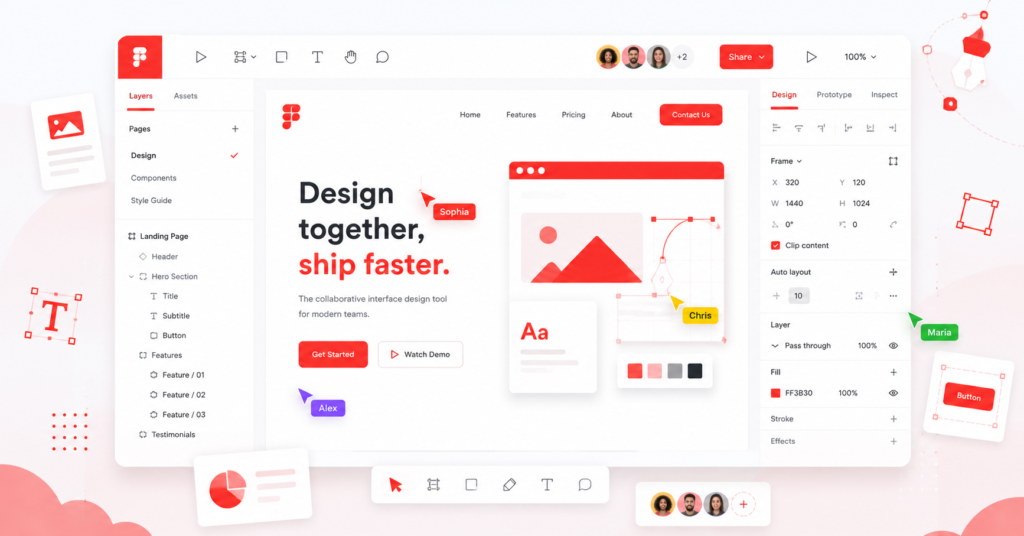
Figma revolutionized UI/UX design when it launched as a browser-based collaborative tool. Before Figma, designers struggled with file sharing, version conflicts, and platform limitations. Figma solved all of that — and quickly became the industry standard.
Today, millions of designers, product managers, and developers rely on Figma daily. Consequently, it built an enormous ecosystem of plugins, templates, and community resources.
Core Features That Made Figma an Industry Standard
Vector Editing
Figma provides precise, professional-grade vector tools for icons, illustrations, and UI components.
Design Systems
Teams build shared component libraries that everyone accesses consistently.
Prototyping
Figma lets designers create interactive prototypes without writing a single line of code.
Dev Mode
Developers inspect designs, copy CSS values, and export assets directly from Figma.
FigJam
Figma’s whiteboarding tool supports brainstorming, user journey mapping, and team workshops.
Auto Layout
Components respond automatically to content changes, saving hours of manual adjustment.
Figma’s Collaboration Tools Explained
Figma built its entire platform around real-time collaboration. Multiple team members can work on the same file simultaneously, leave comments, and review changes — all without ever emailing a file back and forth.
Moreover, Figma integrates with Slack, Jira, Notion, and dozens of other tools, making it a natural fit for large product teams. As a result, design reviews happen faster and miscommunication drops significantly.
Claude Artifacts vs Figma — Feature-by-Feature Comparison
UI/UX Design Capabilities
| Feature | Claude Artifacts | Figma |
| Visual drag-and-drop | ❌ No | ✅ Yes |
| AI-generated UI | ✅ Yes | ⚠️ Limited (via plugins) |
| Vector illustration | ❌ No | ✅ Yes |
| Code output | ✅ HTML/CSS/React | ✅ Dev Mode export |
| Component libraries | ❌ No | ✅ Yes |
| Interactive prototypes | ⚠️ Basic | ✅ Advanced |
Verdict
Figma wins for traditional visual design work. However, Claude Artifacts wins for speed and AI-driven UI generation.
Real-Time Collaboration
Figma clearly leads in collaboration. Multiple designers edit files simultaneously, managers leave pinned comments, and stakeholders view prototypes without needing an account.
Claude Artifacts, on the other hand, focuses on individual productivity. While teams share generated artifacts easily, the tool does not yet offer the synchronized multi-user editing that Figma perfected. Therefore, for large cross-functional teams, Figma still holds the advantage here.
AI Integration & Automation
This is where Claude Artifacts shines brightest. Claude understands natural language instructions, generates complete UI components, and iterates based on your feedback — all without any manual design work.
Figma, meanwhile, introduced AI features in 2024 and 2025, including auto-fill, AI-powered search, and basic component suggestions. However, these features still feel supplementary rather than central. In contrast, AI is the entire foundation of Claude Artifacts — not an add-on.
Consequently, teams that want AI at the core of their design process strongly prefer Claude Artifacts.
Pricing Comparison (Free vs Paid Plans)
| Plan | Claude Artifacts | Figma |
| Free Tier | ✅ Available via Claude.ai | ✅ Starter (limited) |
| Pro/Individual | Claude Pro — ~$20/month | Figma Professional — $15/editor/month |
| Team Plan | Claude Team — $25/user/month | Figma Organization — $45/editor/month |
| Enterprise | Claude Enterprise (custom) | Figma Enterprise — $75/editor/month |
Note: Figma’s pricing scales quickly for large teams. Therefore, many startups find Claude significantly more cost-effective, especially when they already subscribe for other AI tasks.
Ease of Use for Beginners vs Professionals
Claude Artifacts requires zero design knowledge. You simply type what you want, and Claude produces results. Beginners find this approach incredibly liberating — they build impressive UIs on their very first try.
Figma, however, has a steeper learning curve. New users often spend weeks mastering auto layout, component variants, and design system principles. That said, professionals who invest that time gain powerful, precise control over every pixel.
Bottom line: Claude Artifacts is easier for beginners. Figma rewards professionals who put in the learning time.
What Big Companies Say — Real Reviews & Case Studies
Real-world usage tells the most honest story. So, let’s look at how major companies actually use these tools.
How Microsoft Teams Uses Figma
Microsoft adopted Figma deeply across its product design teams. Designers working on Microsoft Teams, Azure, and Office products use Figma’s design system capabilities to maintain consistency across hundreds of screens. The ability to update a single component and see changes cascade across an entire system saves Microsoft’s teams enormous time.
Moreover, Microsoft values Figma’s Dev Mode, which allows its engineering teams to inspect and implement designs accurately — reducing back-and-forth between design and development by a significant margin.
Airbnb’s Design System Built on Figma
Airbnb is one of the most recognized examples of Figma success in the industry. The company built its entire “DLS” (Design Language System) inside Figma, allowing designers across every time zone to access, use, and contribute to a single source of truth.
Furthermore, Airbnb’s design team published their approach publicly, inspiring thousands of other companies to follow the same model. This widespread influence demonstrates just how deeply Figma has embedded itself into the enterprise design workflow.
Companies Adopting Claude AI in Their Design Workflow
While Claude Artifacts is newer to the design space, forward-thinking companies already integrate it into their build processes. Software agencies use Claude to rapidly generate UI mockups during client discovery phases, cutting prototype delivery time from days to hours.
Additionally, marketing teams use Claude Artifacts to build landing pages, email templates, and interactive dashboards — without waiting for a designer’s availability. This speed advantage proves especially valuable for startups and growth teams that need to move quickly.
Several Y Combinator-backed startups reported in early 2026 that they use Claude Artifacts for their initial product prototyping before handing off polished designs to Figma for refinement. This hybrid workflow combines the best of both worlds.
Startup vs Enterprise — Which Tool Fits Which?
| Company Type | Recommended Tool | Reason |
| Solo Founders | Claude Artifacts | Fast, no design skills needed |
| Small Startups (2–10 people) | Claude Artifacts + Figma | Speed + polish combined |
| Mid-size Product Teams | Figma | Collaboration and system design |
| Large Enterprises | Figma | Scale, governance, and Dev Mode |
| AI-first companies | Claude Artifacts | Native AI workflow integration |
Pros and Cons: Claude Artifacts vs Figma
Pros of Claude Artifacts
✅ Generates complete UIs from plain text descriptions instantly.
✅ No design experience required to get started.
✅ Bridges design and code in a single step.
✅ Integrated into Claude’s broader AI capabilities (research, writing, analysis).
✅ Cost-effective, especially for teams already using Claude.
✅ Iterates rapidly based on conversational feedback.
✅ Perfect for prototyping, MVPs, and content-driven layouts.
Cons of Claude Artifacts
❌ Does not support traditional drag-and-drop visual editing.
❌ Lacks advanced prototyping and animation features.
❌ No shared component libraries or design systems yet.
❌ Limited collaboration features compared to Figma.
❌ Less precise control over individual design elements.
❌ Not yet a replacement for pixel-perfect production design.
Pros of Figma
✅ Industry-standard tool trusted by millions of professionals.
✅ Exceptional real-time collaboration for large teams.
✅ Powerful design system and component library management.
✅ Advanced prototyping with complex interactions and animations.
✅ Deep integrations with Jira, Slack, Notion, and developer tools.
✅ Massive community with free templates, plugins, and resources.
✅ Dev Mode bridges the design-to-development handoff perfectly.
Cons of Figma
❌ Steep learning curve for new users.
❌ Expensive at scale — costs rise sharply with team size.
❌ AI features still feel like add-ons rather than core functionality.
❌ Performance can slow down in very large, complex files.
❌ Requires significant investment in setup for design systems.
Which Tool Should You Choose in 2026?
The right tool depends entirely on what you need to accomplish. So, let’s break it down by use case.
Best for Solo Designers
If you work alone and want to move fast, Claude Artifacts is your best friend. You describe your vision, iterate quickly, and ship designs without spending hours in a traditional design editor. Furthermore, the cost is low — especially if you already use Claude for other tasks.
However, if you specialize in professional visual design and need precise vector control, Figma still delivers more power in your hands.
Best for Design Teams
Design teams almost always benefit more from Figma. Its real-time collaboration, shared component libraries, and design system management simply have no equal in 2026. Teams that work across multiple time zones, coordinate with developers, and maintain large product surfaces need what Figma provides.
That said, many design teams now use Claude Artifacts alongside Figma — using Claude for rapid ideation and Figma for final, production-ready design work.
Best for AI-Assisted Projects
If you work on AI-first products, content-heavy applications, or rapid-iteration projects, Claude Artifacts wins without question. The ability to go from a text description to a working React component in seconds gives AI-assisted teams a massive speed advantage.
Moreover, as Claude continues improving, its design output will only get more sophisticated. Teams that adopt Claude Artifacts now will build stronger AI-integrated workflows for the future.
Final Verdict — Claude Artifacts or Figma?
Here is the honest truth: Claude Artifacts and Figma serve different purposes — and the smartest teams use both.
Choose Claude Artifacts when you need speed, AI integration, and the ability to generate functional designs from plain language descriptions.
Choose Figma when you need precise visual control, real-time team collaboration, and professional-grade design systems.
Use both when you want the full power of AI-driven ideation combined with production-quality visual design.
In 2026, the designers and teams that win are not the ones who pick sides. Instead, they are the ones who build flexible workflows that combine the strengths of every tool available.
Claude Artifacts is not replacing Figma. Rather, it is expanding what design looks like — making it faster, more accessible, and deeply AI-powered. Figma, meanwhile, continues to lead in professional visual design and team collaboration.
The real question is not which tool is better. The real question is: which tool moves your team forward faster?
Now you have everything you need to decide.
Frequently Asked Questions (FAQ)
Q: Can Claude Artifacts completely replace Figma? Not yet. Claude Artifacts excels at rapid UI generation and AI-powered iteration, but it lacks Figma’s visual precision, animation tools, and design system management. Most teams use both together.
Q: Is Claude Artifacts free to use? Yes, Claude offers a free tier through Claude.ai with limited usage. Claude Pro ($20/month) and Claude Team ($25/user/month) unlock higher usage limits.
Q: Which tool do big companies prefer in 2026? Large enterprises still predominantly use Figma for their design systems and team collaboration. However, many companies now integrate Claude Artifacts for rapid prototyping and AI-assisted development.
Q: Is Figma worth the price for small teams? Figma’s Starter plan covers basic needs for free. However, small teams that need collaboration features will pay $15/editor/month for the Professional plan. For very small teams, Claude Artifacts offers strong value at a lower cost.
Q: Which tool is better for beginners? Claude Artifacts is significantly easier for beginners — you simply describe what you want and it builds it. Figma has a steeper learning curve but offers more control for advanced users.