
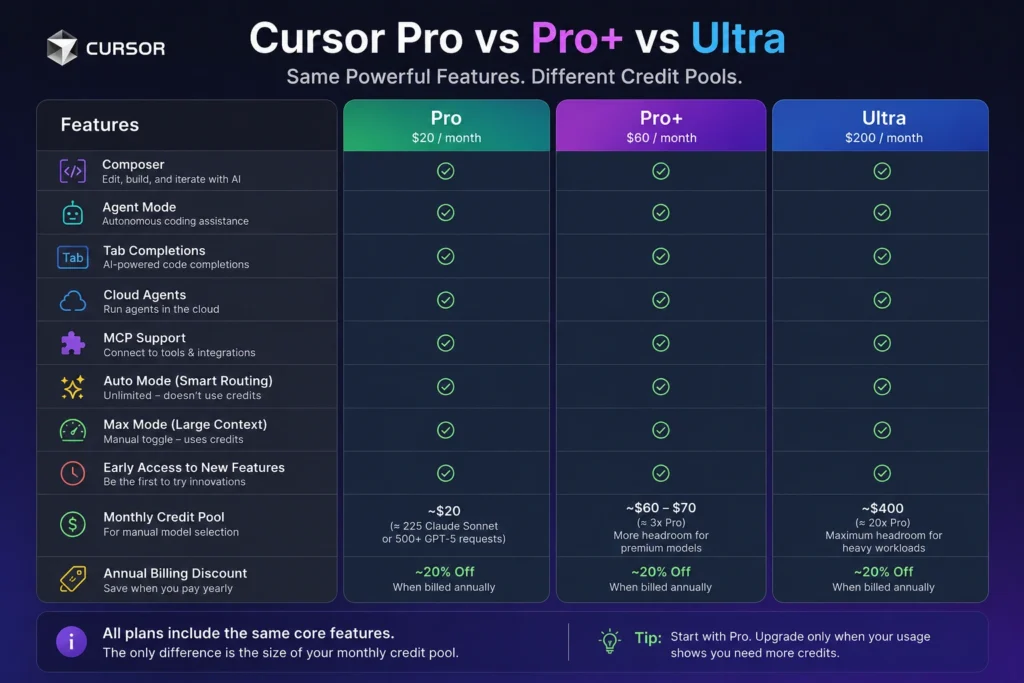

Cursor Pro vs Pro+ is $20 a month versus $60 a month. On the legacy plans existing subscribers still hold, Pro, Pro+, and Ultra share the same editor features: both monthly usage pools, unlimited Tab completions, Bugbot, Cloud Agents, Automations, Origin, and the Cursor SDK. Pro+ includes more of each pool than Pro. Ultra, at $200 a month, includes more again. Prices checked against Cursor’s docs on 25 October 2026.
Searchers also type this as Cursor Pro Plus, or Cursor Pro vs Pro Plus. On the billing docs checked today the name is Pro+. Same $60 tier.
People who already pay for Pro can move to Pro+ and stay on that legacy menu. New customers start on The X Subscription. The closest new plans are Premium at $30 and Super at $100. Ultra is $200 on both menus, with different rules under the sticker.
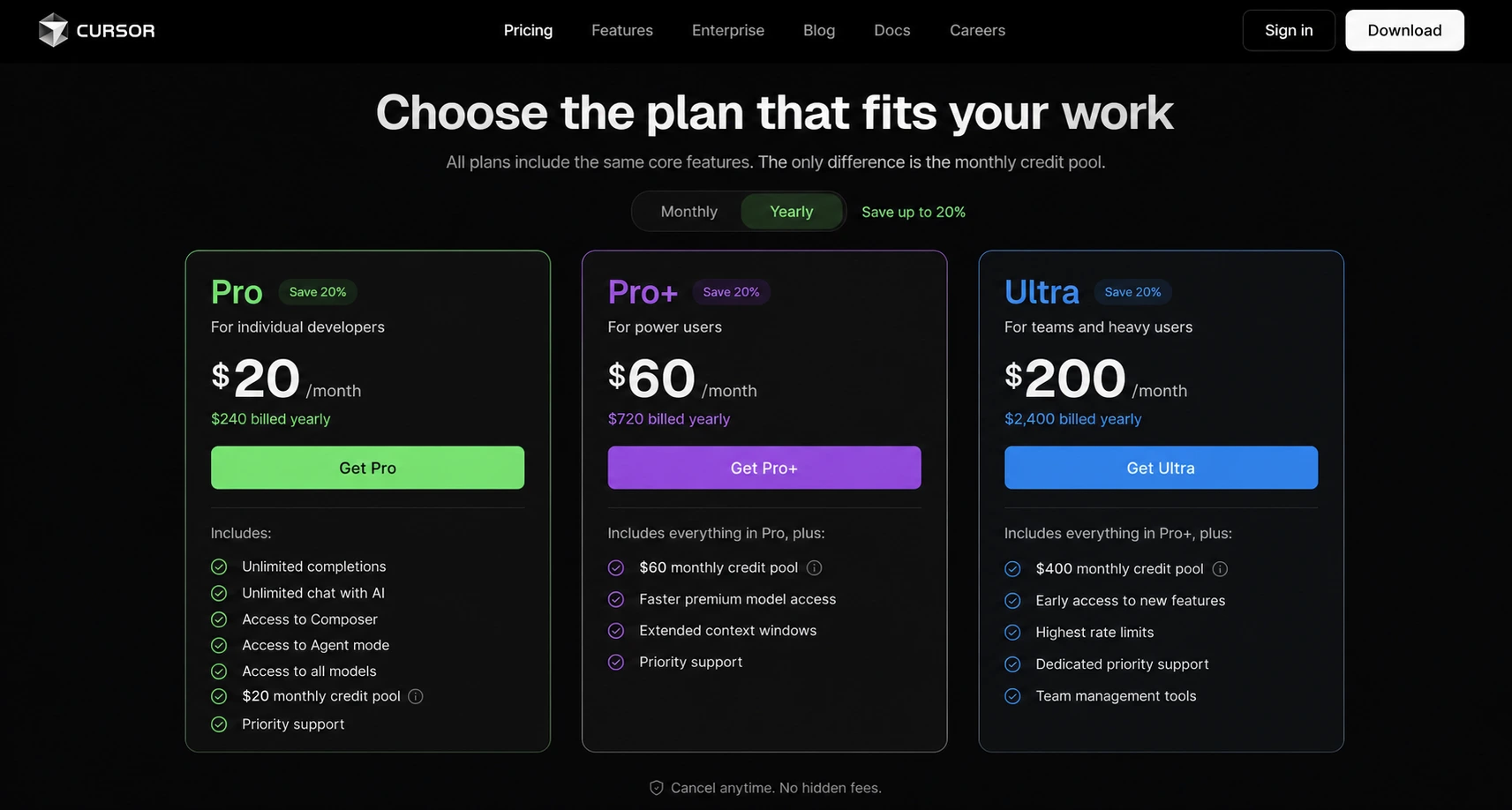
Cursor Pro vs Pro+: the difference
Stay on Cursor Pro when the included pools last the month. Upgrade to Pro+ when on-demand charges on Pro usually cost more than the $40 gap between the two prices. Ultra comes after that, once Pro+ is the plan that runs out.
| Queries | Cursor Pro | Cursor Pro+ (Pro Plus) |
| Monthly price | $20 | $60 |
| Who can still buy it | Existing legacy subscribers | Existing legacy subscribers |
| Tab completions | Unlimited | Unlimited |
| Bugbot, Cloud Agents, Automations, Origin, Cursor SDK | Included | Included |
| Usage pools | Cursor Models and Other Models, reset monthly | More of each pool than Pro |
| Fast mode and Grok effort levels | Included | Included |
| Extra usage | On-demand, off until you turn it on | Same switch |
| Closest plan for a new buyer | Premium, $30/mo | Super, $100/mo |
The $40 gap is the difference Cursor actually prints. The legacy plan page says Pro+ includes more of each pool than Pro. It does not print a multiplier, a dollar cap, or a token count. An earlier version of this article estimated those pools at about $20, $60–$70, and $400, and it treated Auto as unlimited. The docs linked above describe a different system. Read your usage dashboard for the number that applies to your account. The longer upgrade test is in is Cursor Pro+ worth it.
Two pools, and why the model you pick matters more than the tier
Legacy Pro, Pro+, and Ultra split included usage into two pools. Both reset on the billing date. Both are visible in editor settings and on the usage dashboard.
- Cursor Models pays for Grok 4.7, Grok 4.6, Grok 4.5, and Composer 2.5.
- Other Models pays for third-party models such as Claude, GPT, and Gemini, at each model’s API price. Pro, Pro+, Ultra, and Teams include this pool. Hobby and Start do not.
Select a third-party model, or let Auto route to one, and that request draws Other Models at list price. A named third-party model inside a subagent does the same, even when the parent chat is on Auto, Grok, or Composer. The plan decides how large the pools are. The model picker decides how fast they empty.
Cursor’s help page now calls the old Auto mode Cost mode, and it says individual plans have Cost mode only. Cost mode bills as a Cursor-model request. On legacy plans the docs still describe a plain Auto route, and a third-party landing spends Other Models. Use the picker on your account if those two sentences do not match your screen. Cursor has already renamed this once.
This sketch uses the standard rates on Cursor’s models and pricing page. It ignores prompt-cache reads, which make a repeated file cheaper, and it ignores Fast mode, which is priced higher. One heavy turn here means 200,000 input tokens and 8,000 output tokens. The table prices that turn. Cursor still has not published how many of those turns fit inside Pro.
| Model | Pool on a legacy plan | Rate per million tokens | One heavy turn |
| Composer 2.5 | Cursor Models | $0.50 in / $2.50 out | $0.12 |
| Grok 4.7 | Cursor Models | $2 in / $6 out | $0.45 |
| Claude Opus 5.5 | Other Models | $4 in / $20 out | $0.96 |
Grok 4.7 on that arithmetic is $0.448, rounded to $0.45. Composer 2.5 is one-eighth the token price of Claude Opus 5.5 on the same sketch. A month of deliberate Opus runs hits a wall that a month of Composer does not. Pro+ buys a larger pool. It leaves the price of each run where it was.

What Cursor Pro includes:
A legacy Cursor Pro subscription at $20 a month includes:
- Unlimited Tab completions
- A monthly Cursor Models pool and a monthly Other Models pool
- Fast mode and adjustable Grok effort
- Bugbot for code review, Cloud Agents, Automations, Origin for code hosting, and the Cursor SDK
- On-demand usage after you turn it on, with a spend limit you choose
The docs describe those pools and never state a Cursor Pro token limit. There is no official “225 Sonnet requests” or “500 GPT requests” line to quote. Treat any page that still prints those counts as a guess.
Hobby, the free legacy plan, includes Agent, Chat, and Tab with limited usage. Pro adds unlimited Tab, both usage pools, Bugbot, Cloud Agents, Automations, Origin, and the Cursor SDK. Start, the paid India plan, is a third shape and is covered below.
Grok 4.7, Grok 4.6, Grok 4.5, and Composer 2.5 draw the Cursor Models pool. Claude, GPT, Gemini, and the rest of the third-party list draw Other Models until that pool is gone, then on-demand if you enabled it. The live rate card is the models and pricing page.
An older request-based plan still exists beside the pool plans. On that older plan, Max Mode extends context and bills at the model’s API rate plus 20%. A dashboard that shows two monthly pools is the pool system in the table above. Watch the pool spend.
Cursor Pro vs Pro+ vs Ultra:
Legacy Ultra is a bigger pair of pools on the same feature list. The legacy plan page does not add a feature that only Ultra gets. Early access to new products and models is written on the new Ultra tier, in the next section. Confirm it on your own billing page before you count it as part of a legacy Ultra login.
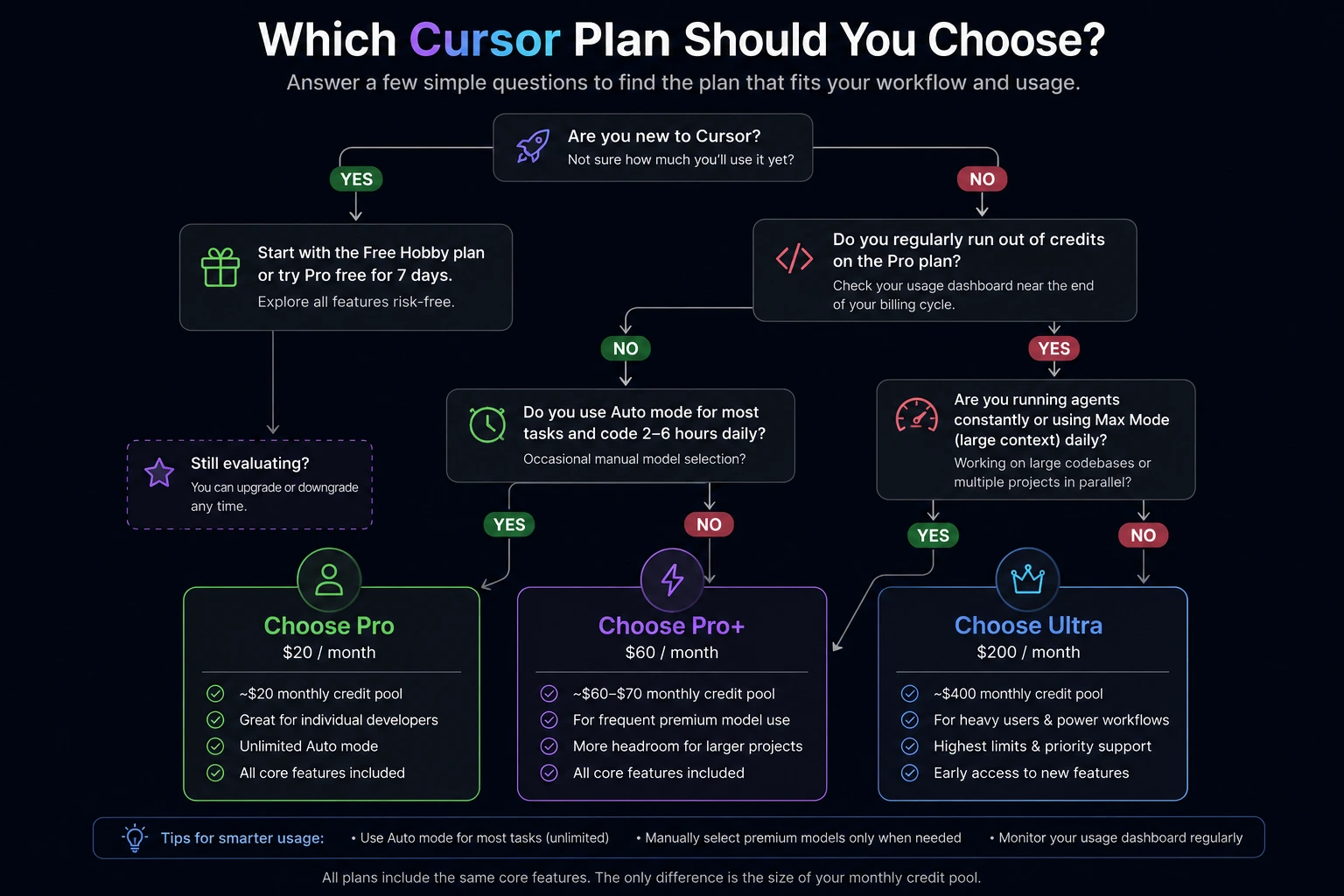
| Plan | Price | Credit Pool | Best For |
| Pro | $20/month | ~$20 | Daily coding, 2-6 hrs/day |
| Pro+ | $60/month | ~$60-70 (3x) | Frequent premium-model use |
| Ultra | $200/month | ~$400 (20x) | Heavy agent workloads, teams of one |
Cursor Pro+ vs Ultra:
The gap is $140 a month. Pro+ fits when Pro’s on-demand bill is the part that hurts and the work would sit inside a larger included pool. Ultra fits when Pro+ runs out as a habit: several agents, long sessions, third-party models chosen on purpose.
For one person, Ultra is a lot of rent for spare capacity. I would want two billing cycles where on-demand on Pro+ was routinely over that $140 before I paid $200 to flatten the invoice. When the real question is Cursor or Claude at the top price, use Claude Max vs Cursor Ultra.
New checkout: Premium, Super, and Ultra
New buyers land on Cursor’s pricing page and the pricing help. Cursor is part of The X Subscription: one subscription for Grok, Cursor, and X. The prices below exclude tax. Annual billing charges ten times the monthly price and covers the full year.
| Plan | Monthly | Yearly | Included usage | Third-party models in Cursor |
| Plus | $8 | $80 | Base | Not on this plan |
| Premium | $30 | $300 | 4x Plus | API list price, from prepaid credit |
| Super | $100 | $1,000 | 15x Plus | API list price, from prepaid credit |
| Ultra | $200 | $2,000 | 50x Plus | API list price, from prepaid credit |
Those multiples are against Plus, not against legacy Pro. Premium is 4x the $8 plan’s usage. It is not “4x Cursor Pro.”
Cursor’s own guidance on the models page: Premium for someone new to Agent, Super for daily Agent use, Ultra for power users running several agents or Automations. Plus is the cheap on-ramp with a fixed setup. It runs Grok 4.7, Grok 4.6, Grok 4.5, and Composer 2.5 with Fast off and effort at medium. Auto, Cloud Agents, Automations, Bugbot, Origin, and third-party models sit on Premium and above. Plus is the wrong card if you came here to replace Cursor Pro.
On Premium and above, third-party models bill from the first request, at API list price, out of prepaid credit. That is a different shape from legacy Pro, where Other Models is included until the pool empties.
Moving an existing Pro or Pro+ account onto this menu is optional, and the switch is permanent. Cursor says each paid X plan includes at least twice as much coding usage on Cursor models as the legacy plan it replaces, and it adds Grok and X benefits. The included third-party allowance goes away in the same switch. Two monthly pools become one weekly pool shared with Grok apps. On-demand becomes top-ups. Billing moves to grok.com.
I would keep legacy Pro when Claude, GPT, or Gemini inside the editor is a normal week and the Other Models pool still lasts. Twice the Cursor-model usage is a real increase. Giving up the included third-party pool can cost more than the $10 between Pro at $20 and Premium at $30. Switch when you want Grok and X on the same bill and you have already looked at a month of third-party spend. The individual path is cursor.com/unify. The comparison table is on the legacy plans page.
“SuperGrok versus Cursor Pro” runs into the same rename. Super is the $100 tier on The X Subscription. Cursor is included in it. It is a plan on that menu, not a rival editor.
Legacy subscribers can still move among Pro, Pro+, and Ultra without that switch. A yearly option appears as an Upgrade Now banner in billing. The help page does not publish the legacy yearly dollar amount, so this page will not guess one. The yearly figures in the table above are the published ones.
On-demand usage versus a Pro+ upgrade
On-demand is a switch on the plan you already have. On Pro, Pro+, and Ultra it stays off until you enable it under Spending at cursor.com/dashboard/spending. Past the included pools, usage bills monthly in arrears at the same per-model rates, at the same quality and speed. Set a monthly spend limit in that screen.
Leave the switch off, or keep the limit low, when the overage is a bad week. Move from Pro to Pro+ when the overage shows up most months and it usually clears $40, the price of the upgrade itself. Turning the switch on and jumping to Pro+ in the same month can mean a higher subscription plus another invoice. Pro+ is a larger pool with a later wall.
To upgrade and stay on the legacy menu:
- Open cursor.com/dashboard/billing.
- On the current-plan tile, choose Adjust plan.
- Select Pro+ and finish checkout.
The higher plan starts immediately. Credit for the previous plan follows unused included usage, not unused days. A downgrade waits until the billing period ends. This path does not enroll you in The X Subscription.
Hobby, Start, and Teams VS Pro:
Hobby VS Pro. Hobby is the free legacy plan limited Agent, Chat, and Tab. Pro is $20 on an existing account, with unlimited Tab, both pools, Bugbot, Cloud Agents, Automations, Origin, and the SDK. Test on Hobby or the current Free plan. Pay when the limit is what stops the work.
Start VS Pro. Start is India only, ₹649 a month, tax inclusive, billed in INR. It includes the Cursor Models pool, Cloud Agents, and Cursor for iOS. Other Models, on-demand usage, Bugbot, Auto, Automations, and the Cursor SDK are outside that plan. Grok and Composer run at a fixed medium effort and standard speed. You also buy Start from the free plan; a paid account does not switch back onto it. Start fits when Cursor’s own models are the whole job. Pro, or Premium for a new account, is the step when you want Claude or GPT in the editor.
Team VS Pro. A team seat buys shared billing and admin. It is a poor way to shop for a bigger personal pool. Legacy Teams Standard is $40 per user a month. Legacy Teams Premium is $120 per user and includes 5x the Standard allowance. Usage sits on the seat and resets with the team cycle. It does not spill over to a teammate who barely used theirs. New team seats are $30, $100, or $200, matching Premium, Super, and Ultra. Plus is not a team seat. On Teams and Enterprise, eligible third-party requests also add a Cursor Token Rate of $0.25 per million tokens. Individual Pro, Pro+, and Ultra accounts do not pay that rate.
A solo developer who wants more headroom changes the individual tier. A company that wants one invoice, SSO, and an admin-controlled privacy setting looks at Teams. Seat prices across Cursor, Claude, and Copilot are mapped in what AI coding tools cost.
Cursor Pro vs ChatGPT Plus
ChatGPT Plus is $20 a month for the ChatGPT app, billed monthly. OpenAI’s help center says Plus has no annual plan, and API usage is billed on its own. On the ChatGPT pricing page, Plus includes Codex. ChatGPT Pro is the higher OpenAI tier, with longer Codex sessions and a choice of usage tiers. That page does not print one Pro price, so none is repeated here.
Legacy Cursor Pro at $20 is the editor plan: Tab, Agent, two pools, Bugbot, and cloud agents. A new Cursor customer shopping near that budget is looking at Premium at $30, because Pro is not on the new checkout.
Plus is the right $20 when the work is chat, research, and Codex inside ChatGPT. Cursor is the right bill when the work is the repo in the editor. The agent comparison is Codex vs Claude Code. The editor-versus-plugin comparison is Claude Code vs Cursor vs GitHub Copilot. The same “is the next tier worth the gap” question on Copilot is Copilot Pro vs Pro+.
Which Cursor plan to buy
| Your situation | Plan that matches it |
| You are trying the editor | Free, or legacy Hobby if the account already shows it |
| India, and Cursor’s own models are enough | Start, ₹649/mo |
| You already have Pro and the pools last the month | Stay on Pro, $20/mo |
| On-demand on Pro usually costs more than $40 | Pro+, $60/mo |
| On-demand on Pro+ usually costs more than $140 | Ultra, $200/mo, after the Claude Max comparison |
| New account, Agent is occasional | Premium, $30/mo. Plus at $8 only with the feature fence above |
| New account, Agent is a daily habit | Super, $100/mo |
| Several agents or Automations | Ultra, $200/mo on the new menu |
| SSO and one company invoice | Teams, rather than a pile of Pro seats |
On the new plans the yearly prices are the straightforward discount: Premium $300 instead of $360, Super $1,000 instead of $1,200, Ultra $2,000 instead of $2,400. Pay yearly after the tier is already the one you finish the month on. A yearly charge is an expensive way to discover the pool is the wrong size
Forty dollars a month, and a larger pair of usage pools on Pro+. Unlimited Tab, Bugbot, Cloud Agents, Automations, Origin, and the Cursor SDK are on both legacy plans. Cursor’s docs do not publish a token cap for either one. Pro Plus is another spelling of Pro+.
It earns the $60 when on-demand on Pro is a normal month and that extra bill usually passes $40. It is wasted money when Pro’s included usage still lasts to renewal. The step-by-step version is in is Cursor Pro+ worth it.
For a solo developer, after Pro+ is already too small. The step from Pro+ to legacy Ultra is $140 a month. On the new menu, Ultra is $200, with 50x Plus usage and earliest access to new products and models. Third-party models there are prepaid from the first request.
On a legacy account: unlimited Tab completions, monthly pools for Cursor models and third-party models, Fast mode, Bugbot, Cloud Agents, Automations, Origin, and the Cursor SDK. Grok 4.7, Grok 4.6, Grok 4.5, and Composer 2.5 draw the Cursor Models pool. Claude, GPT, and Gemini draw the Other Models pool at API price.
Legacy Cursor Pro is $20 a month. Pro+ is $60. Ultra is $200. Billing can offer a yearly switch on those plans, and the help page does not list the discounted legacy amount. Published yearly prices are for the new plans: Premium $300, Super $1,000, Ultra $2,000, before tax.
Open cursor.com/dashboard/billing, choose Adjust plan, and check out on Pro+. The upgrade starts immediately. A downgrade is scheduled for the end of the current period. You can do this and remain on the legacy plan. The X Subscription is a separate switch, and that one is permanent.
Prices checked 25 October 2026 against Cursor’s pricing help, the legacy plans doc, and the models and pricing doc. If your dashboard and this page ever disagree, the dashboard is the one sending the invoice.