

I wasted three weekends last year “vibing” apps that looked finished in the demo and fell apart the moment someone clicked a second button.
That’s the quiet truth nobody puts in the top of these roundups. The best vibe coding tools in 2026 are ridiculous — until you pick the wrong one for the job. Then you’re stuck in a loop of regenerating the same broken auth flow while the free credits drain.
This guide is the one I wish I’d had before buying three subscriptions at once.
Quick answer
| If you are… | Use this | Why |
| A developer working in a real codebase | Cursor | Best daily AI IDE loop |
| Doing big refactors / terminal agent work | Claude Code | Strongest autonomous coding agent |
| A non-technical founder shipping an MVP | Lovable | Cleanest path to a full-stack web app |
| Prototyping something throwaway in a browser | Bolt.new | Fastest zero-setup demos |
| Wanting code + hosting in one place | Replit Agent | All-in-one build → deploy |
| Generating React/Next UI for an existing repo | v0 (Vercel) | Best component-quality output |
| On a tighter budget, still want an AI IDE | Windsurf | Solid Cursor alternative, often cheaper entry |
What “vibe coding” actually means (and what it doesn’t)
Andrej Karpathy coined the phrase on February 2, 2025. His original description was blunt: fully give in to the vibes, accept the AI’s changes without reading every diff, paste errors back in until they go away, and treat the code like something you steer more than write.
That definition matters, because marketers stretched it into “anyone who uses Copilot once.”
Real vibe coding in 2026 usually means one of two workflows:
- Prompt-to-app builders — you describe a product; the tool generates a runnable app (Lovable, Bolt, Replit Agent).
- Agentic coding inside a real engineering environment — you still work in a repo/IDE/terminal, but the AI does multi-file work while you supervise (Cursor, Claude Code, Windsurf).
If you only need autocomplete, that’s not vibe coding. That’s just using an AI pair programmer.
How I ranked these vibe coding tools
I didn’t score “who has the flashiest landing page.” I ranked for what people actually search when they type best vibe coding tools:
- Can it ship something usable in under a day?
- Is the code / product maintainable after the dopamine hit?
- Pricing honesty — subscription floor vs what power users actually pay
- Lock-in risk — can you leave with your code?
- Fit by persona — developer vs founder vs designer vs student
Pricing below reflects publicly listed plans commonly referenced in mid-2026 comparisons. Vendors change quotas often — check the official pricing page before you buy.
1. Cursor — Best vibe coding IDE for working developers
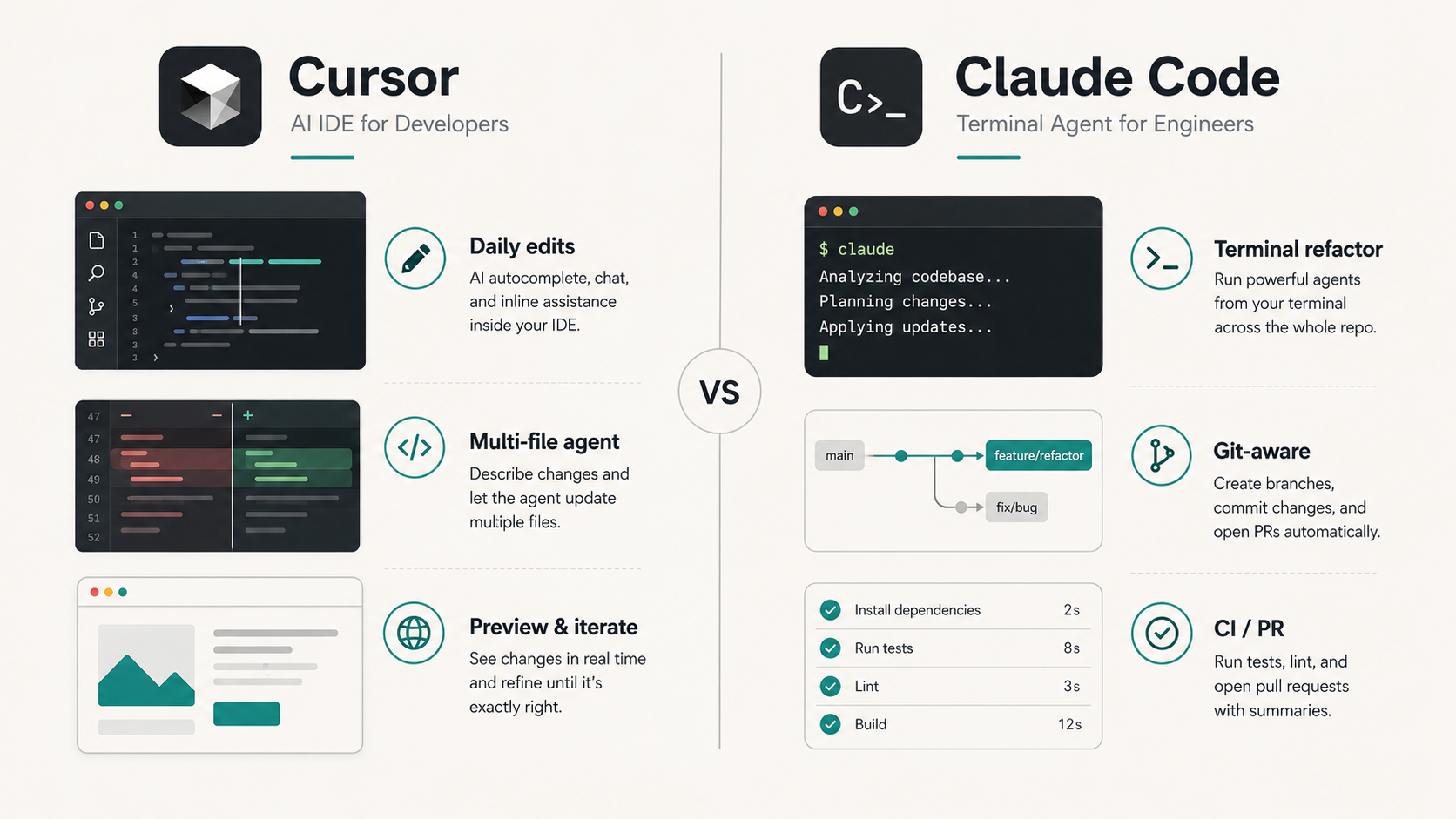
Cursor is still the default AI-native editor for people who already write software. It’s a VS Code fork, so the extension ecosystem feels familiar, and the agent/Composer workflow is where most of the “I described a feature and it touched twelve files” magic happens.
Where it wins
- Daily coding speed: tab completion + chat + agent in one window
- Multi-model flexibility (you’re not stuck on one lab’s models)
- MCP, skills, hooks, and cloud agents on paid plans
- Best fit when you already have a Git repo and a stack you care about
Where it frustrates people
- Usage limits / credit burn on heavy frontier-model agent runs
- Easy to overspend if you leave agent mode on expensive models all day
- Not the right product if you can’t (or won’t) read code
Pricing snapshot (2026): Hobby free tier; Pro around $20/mo; heavier tiers (Pro+ / Ultra) climb toward $60–$200/mo for serious agent volume; Teams around $40/user/mo.
Verdict: If you’re a professional developer and you want one vibe coding tool for your real job, start here.
2. Claude Code — Best terminal agent for hard, boring work
Claude Code is Anthropic’s agentic coding tool. It lives in the terminal (with IDE bridges), and it’s weirdly good at the jobs humans hate: multi-file refactors, “fix the tests and open a PR,” migrations, and long-running cleanup.
This is the tool people reach for when Cursor’s inline loop feels too small for the blast radius.
Where it wins
- Large-context, repo-wide reasoning
- Strong MCP story — connect databases, issue trackers, internal tools
- Headless / scriptable workflows for automation-minded teams
- Excellent when you can describe the outcome, not the keystrokes
Where it frustrates people
- Rate limits. If you’ve ever been mid-refactor when the session hits a wall, you know.
- Heavier Max plans ($100 / $200) become normal for all-day agent use
- Less “pretty UI iteration” than an IDE — it’s not a design tool
Pricing snapshot: Bundled with Claude Pro ($20/mo) for light use; Max 5x / 20x ($100–$200/mo) for power users; API usage also possible.Verdict: Best second tool in a serious stack. Many people run Cursor for daily edits and Claude Code for the big autonomous jobs.
3. Lovable — Best AI app builder for non-technical founders
If the search behind “ai app builder” is really “I need a working product without hiring a team yet,” Lovable is usually the honest answer.
It’s chat-first. You describe the product. It leans on a React + TypeScript stack with deep Supabase-style backend patterns, auth, and deploy paths that feel closer to shipping than tinkering.
Where it wins
- Beginner-friendly without feeling like a toy
- Polished UI output compared to many prompt-to-app tools
- GitHub export / ownership story is stronger than closed sandboxes
- First-party MCP server direction (useful if your team already lives in Claude/Cursor)
Where it frustrates people
- Credit systems punish messy iteration (every “make the button blue” costs something)
- Complex business logic still needs a human who understands systems
- You’ll outgrow it when the product becomes a real engineering org’s problem
Pricing snapshot: Free limited credits; paid often starts near $25/mo for a credit pack; higher tiers for teams / heavier use.
Verdict: Best vibe coding platform when the founder is non-technical and the goal is a real MVP, not a hackathon demo.
4. Bolt.new — Fastest browser prototype (accept the tradeoffs)
Bolt.new (StackBlitz) is the “I need something clickable before the meeting” tool. WebContainers mean you get a full-ish stack in the browser with almost no setup.
Where it wins
- Absurd speed from prompt → running app
- Great for throwaway prototypes, sales demos, hackathons
- Framework flexibility for JS/TS frontends
Where it frustrates people
- People confuse a good demo with a production architecture
- Backend / persistence boundaries show up faster than marketing admits
- Token burn can surprise you if you iterate the same screen fifty times
Pricing snapshot: Free limited tokens; Pro commonly around $20–$25/mo.
Verdict: Best when you know you’re prototyping. Dangerous when you pretend the prototype is the product.
5. Replit Agent — Best all-in-one “build and host it here” option
Replit’s pitch is simple: stop juggling a builder, a database, and a host. Agent builds inside Replit’s environment, and deployment stays close to the place you wrote the code.
Where it wins
- True beginner on-ramp with hosting included
- Solid for learning + shipping small apps in public
- Multi-language surface area beyond pure React toys
Where it frustrates people
- Platform gravity — leaving later is more annoying than vendors admit
- Agent compute / effort-based costs can climb on ambitious apps
- Serious production teams usually graduate to a normal repo + cloud eventually
Pricing snapshot: Free starter credits; Core / paid plans often land around $20–$25/mo, with higher tiers for heavier agent + compute use.
Verdict: Best if you want one browser home for the whole journey. Less ideal if you already have strong opinions about your cloud.
6. v0 by Vercel — Best for UI components, not full products
v0 is frequently dumped into “best vibe coding tools” lists, and that’s only half-right.
It’s exceptional at generating React / Next.js UI — especially if you already deploy on Vercel. It is not a full autonomous product builder in the Lovable/Replit sense.
Use v0 when:
- You need a landing section, dashboard shell, or shadcn-style component
- A developer will paste the output into a real repo
- Design iteration speed matters more than backend magic
Skip v0 when:
- You can’t code at all and need auth + database + payments from one chat box
Pricing snapshot: Free credit drip; Premium around $20/mo; Team seats higher.
Verdict: Best specialized tool in the set. Wrong tool if you expected an entire startup from one prompt.
7. Windsurf — Best budget-leaning Cursor alternative
Windsurf (Codeium lineage / Cognition era depending on how you follow the acquisition news) keeps showing up because people want a Cursor-like IDE without feeling locked into Cursor’s exact pricing psychology.
Where it wins
- Familiar AI IDE patterns
- Often positioned as strong value at the entry paid tier
- Fine daily driver for many full-time builders
Where it frustrates people
- The “almost Cursor” problem — feature parity moves month to month
- Teams already standardized on Cursor rarely switch for vibes alone
Pricing snapshot: Free tier; Pro commonly near $15–$20/mo; higher Max-style tiers for heavy use.
Verdict: Worth a week-long trial if Cursor’s bill stung and you still want an IDE-first workflow.
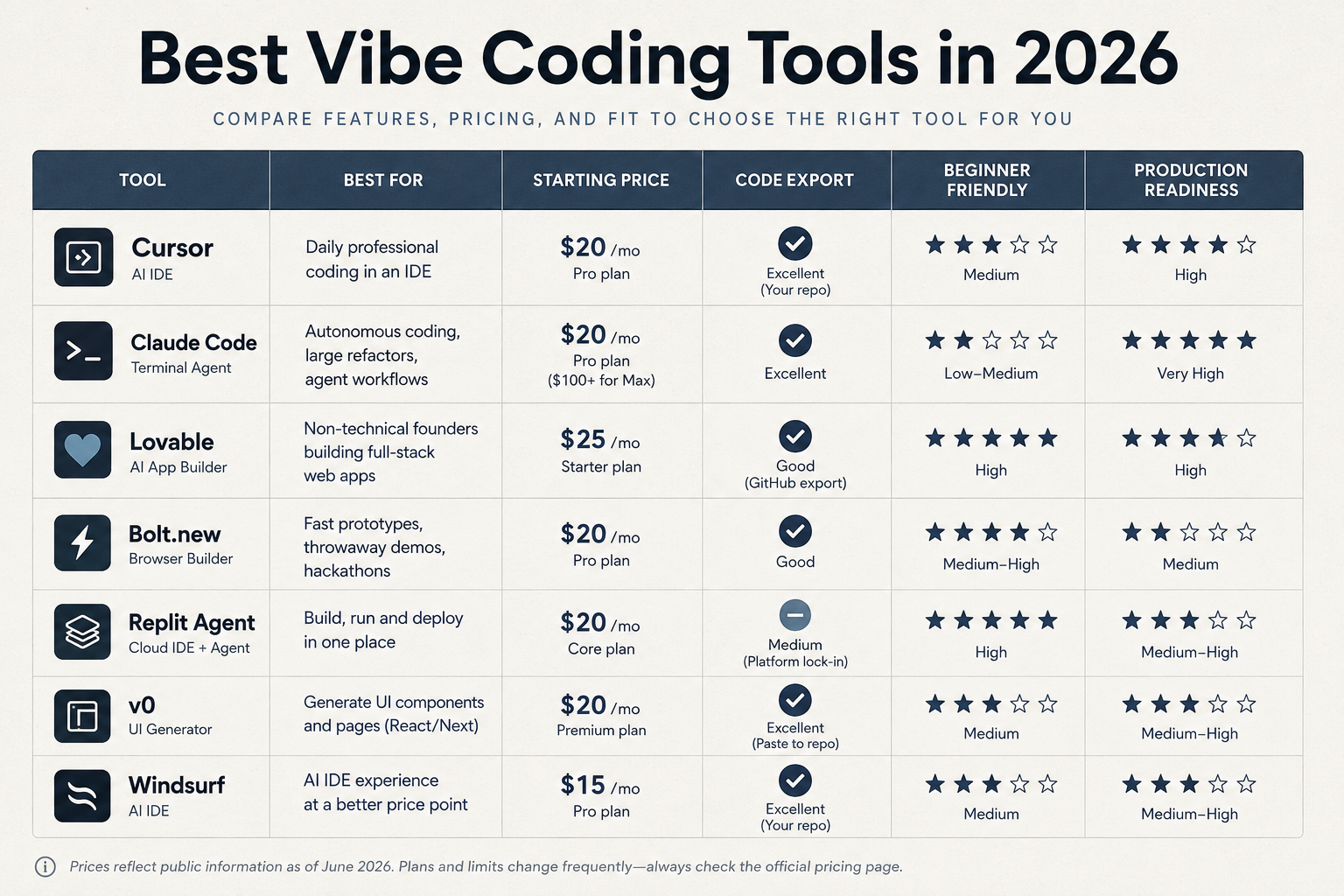
Side-by-side: best vibe coding tools compared
| Tool | Type | Best for | Beginner friendly | Code ownership | Typical paid start |
| Cursor | AI IDE | Daily professional coding | Medium | Excellent (your repo) | ~$20/mo |
| Claude Code | Terminal agent | Large refactors, autonomy | Low–Medium | Excellent | ~$20–$100+/mo |
| Lovable | App builder | Non-tech MVP shipping | High | Good (export/GitHub) | ~$25/mo |
| Bolt.new | Browser builder | Fast prototypes | Medium–High | Good | ~$20–$25/mo |
| Replit Agent | Cloud IDE + agent | Build + host in one place | High | Medium (platform gravity) | ~$20–$25/mo |
| v0 | UI generator | React/Next components | Medium | Excellent (paste into repo) | ~$20/mo |
| Windsurf | AI IDE | Cursor-like on a budget | Medium | Excellent | ~$15–$20/mo |
How to vibe code a website without ending up with garbage
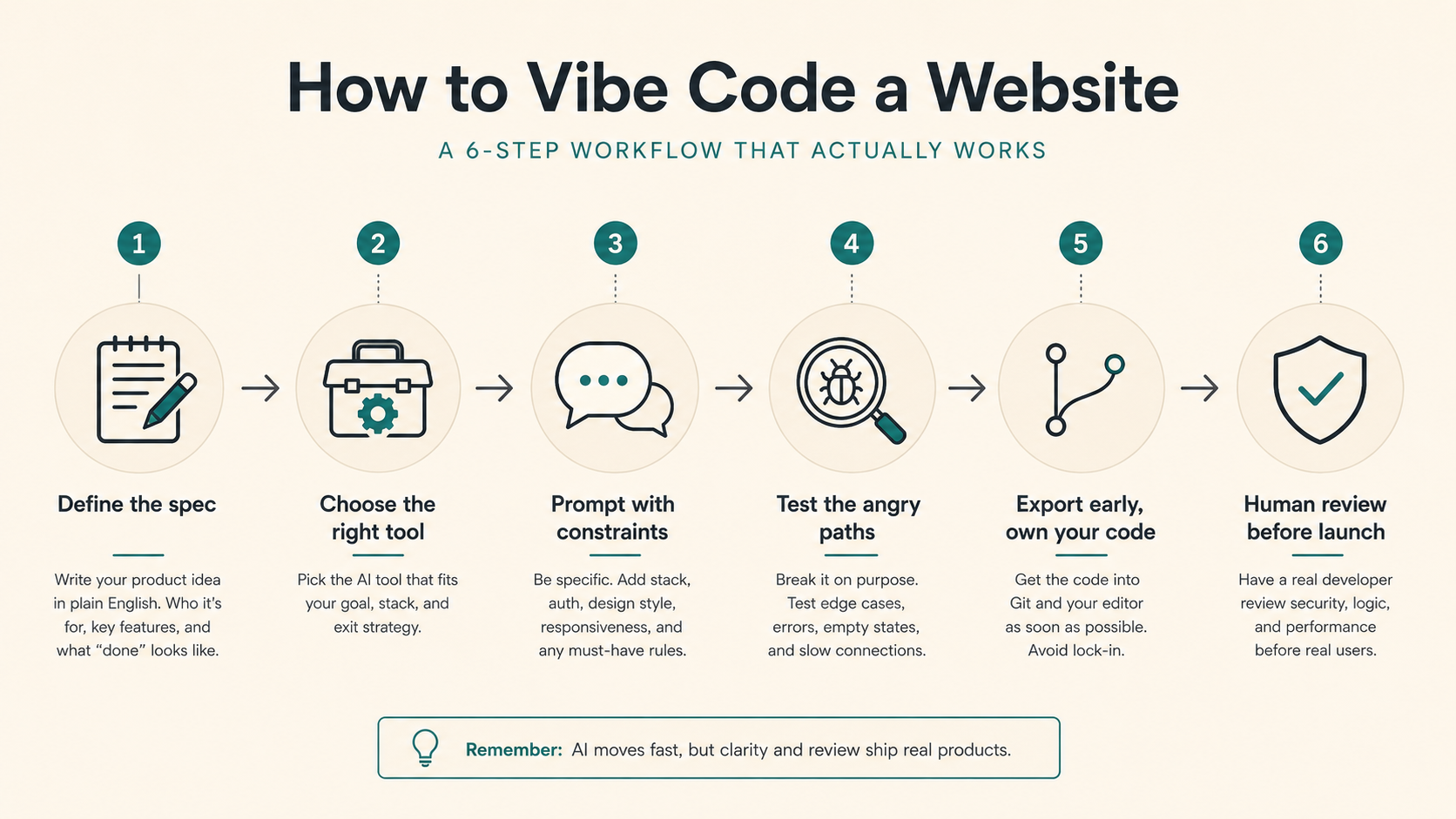
A simple workflow that actually works in 2026:
- Write the product in plain English first. One page: who it’s for, three user actions, what “done” means.
- Pick the tool by exit strategy, not by demo video.
- Need a hosted MVP fast → Lovable or Replit
- Need a disposable demo → Bolt
- Need UI for an existing Next app → v0
- Need to modify a real codebase → Cursor / Claude Code
- Force constraints in the first prompt. Stack, auth provider, “mobile responsive,” “no fake buttons,” “include empty states.”
- Test the angry path immediately. Wrong password, empty form, slow network, duplicate signup. Demos lie; edge cases don’t.
- Export early. If you can’t get the code into GitHub in the first day, you’re renting a science fair project.
- Budget a human review before real users. Auth, payments, and file uploads are where vibe-coded apps get people hurt.
Is vibe coding bad?
Sometimes. Yes.
It’s bad when:
- You ship auth/payments you don’t understand
- Nobody reviews AI-generated code for security basics
- The “app” is a pile of regenerated patches with no architecture
- You’re using it to avoid learning enough to debug production
It’s genuinely good when:
- You’re validating an idea before spending $40k on a contractor
- You’re a developer using agents to clear grunt work
- You’re prototyping UI variants at a speed humans can’t match
- You treat the AI like a fast junior — supervised, not worshipped
Search interest in “is vibe coding bad” has been climbing for a reason. The hype cooled. The scrutiny showed up. That’s healthy
What I’d buy with my own money (personal stack)
If I could only pay for two tools this month:
- Cursor Pro for everyday work
- Claude Code (Max if I’m in a heavy week) for the nasty multi-file jobs
If I’m helping a non-technical founder validate a B2B micro-SaaS:
- Lovable to get a real UI + auth + database shape
- A developer on standby for the week after first users show up
I would not buy four app builders “just in case.” That’s how you spend $100 and still don’t ship.
Final verdict: the best vibe coding tools depend on the job
Here’s the short version again, without the brochure language:
- Best overall for developers: Cursor
- Best autonomous agent: Claude Code
- Best for non-technical founders: Lovable
- Best for speed demos: Bolt.new
- Best all-in-one hosted path: Replit Agent
- Best UI generator: v0
- Best value IDE alternative: Windsurf
If you came here searching for the best vibe coding tools and expected one trophy winner, I get it. The market wants a simple answer. Software doesn’t work that way anymore — and neither do these tools.
Pick the exit you want. Then pick the tool that gets you there without lying to you in the demo.
FAQ
What are the best vibe coding tools in 2026?
For developers: Cursor and Claude Code. For non-technical founders: Lovable. For fast prototypes: Bolt.new. For build-and-host in one place: Replit Agent. For React UI generation: v0.
What is vibe coding?
Vibe coding is building software by describing what you want in natural language and letting AI generate and iterate on the code — often with less manual editing than traditional programming. The term was popularized by Andrej Karpathy in February 2025.
Are AI app builders the same as vibe coding tools?
Overlap, not identical. AI app builders (Lovable, Bolt, Replit Agent) are one branch. AI IDEs and coding agents (Cursor, Claude Code, Windsurf) are another. Both get called vibe coding tools in search results.
Can beginners use vibe coding tools?
Yes — especially Lovable and Replit. Beginners should still avoid shipping payment/auth systems without a review.
How much do vibe coding tools cost?
Most serious paid tiers start around $20–$25/month. Heavy agent users often land at $60–$200/month depending on the product.
Is vibe coding replacing developers?
No. It’s changing what juniors and seniors spend time on. Someone still has to define the product, review risky code, and own production failures.