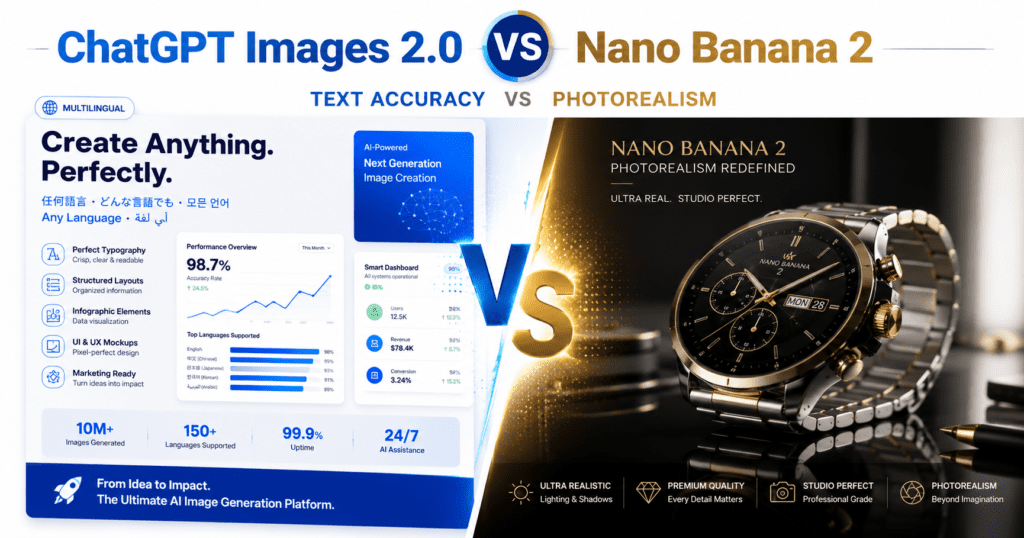

Two months, two major launches. Google dropped Nano Banana 2 in February 2026. OpenAI followed with ChatGPT Images 2.0 in April. Both tools claim to be the best AI image generator on the market right now. Both are genuinely impressive. And both are built for completely different things.
If you are a designer, marketer, developer, or just someone who makes content, you need to know which one fits your work. So instead of listing specs, this post focuses on what actually matters: what each tool does well, where it falls short, and which one you should open first depending on your task.
Everything here is based on real launch data, verified pricing, and benchmark results from April and May 2026.
1. What Are These Two Tools?
Before diving into the comparison, here is a quick introduction to both models.
ChatGPT Images 2.0 (GPT Image 2)
ChatGPT Images 2.0 launched on April 21, 2026. The model behind it is called gpt-image-2 in the API. It is OpenAI’s first image model with a built-in reasoning step, which means it plans the layout of an image before it starts drawing. OpenAI describes it as a shift from a rendering tool to what they call a visual thought partner.
Within 12 hours of launch, gpt-image-2 reached the number one spot on the Image Arena leaderboard with a 242-point lead over the second-place model. That is the biggest margin ever recorded on that leaderboard.
Google Nano Banana 2 (Gemini 3.1 Flash Image)
Nano Banana 2 launched on February 26, 2026. Its official model name is Gemini 3.1 Flash Image, and it is the third version in Google’s Nano Banana line, following the original in August 2025 and the Pro variant in November 2025. The goal with this version was to combine the high-quality output of the Pro model with the faster speed of the Flash model family.
Nano Banana 2 is now the default image model across the Gemini app, Google Search, Google Lens, and Google Flow. Enterprise users can also access it through Vertex AI.
2. Key Differences at a Glance
| Feature | ChatGPT Images 2.0 | Nano Banana 2 |
| Developer | OpenAI | Google DeepMind |
| Launch Date | April 21, 2026 | February 26, 2026 |
| Model Name (API) | gpt-image-2 | Gemini 3.1 Flash Image |
| Max Resolution | 2K (2048 x 2048) | 4K (4096 x 4096) |
| Text Rendering Accuracy | ~95% across 5+ scripts | Good but lower accuracy on complex layouts |
| Generation Speed | 97 to 149 seconds (thinking mode) | 11 to 24 seconds |
| Reasoning / Thinking Mode | Yes (native) | No |
| Web Search Grounding | Yes (thinking mode) | Yes (real-time web) |
| Character Consistency | Up to 8 images per batch | Up to 5 characters |
| Image Editing | Yes (conversational) | Yes (up to 14 reference images) |
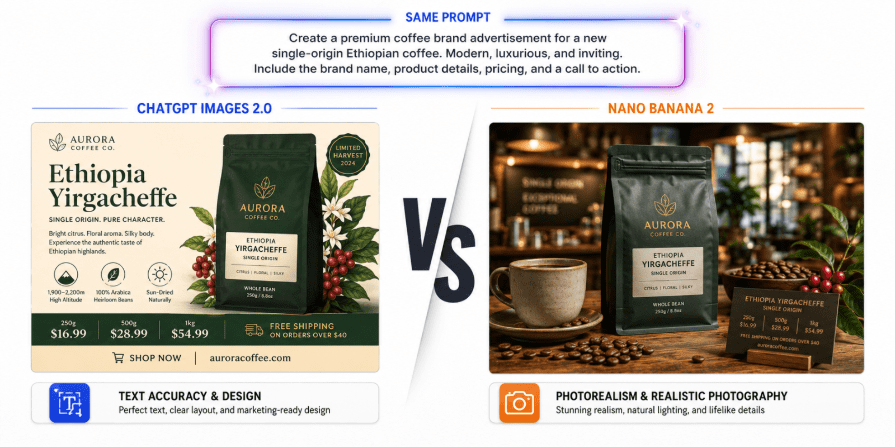
| Best For | Text, layouts, infographics, UI mockups | Photorealism, product shots, creative scenes |
| Free Tier | Instant mode only | Yes (Gemini app and Flow) |
| API Pricing (per image) | $0.006 to $0.211 | $0.045 to $0.151 |
| Available On | ChatGPT, API, Codex | Gemini app, Search, Lens, Flow, Vertex AI |
3. Pricing and Plans Comparison
Pricing is one of the biggest differences between these two tools, and it is worth looking at carefully before you commit to one for production use.
ChatGPT Images 2.0 Pricing
| Quality Tier | Resolution | Price per Image |
| Low | 1024 x 768 | $0.006 |
| Medium | 1024 x 1024 | $0.053 |
| High | 1024 x 1024 | $0.211 |
| High (3840 x 2160) | 4K equivalent | $0.401 |
| ChatGPT Plus | 50 images per 3 hours | $20 per month |
| ChatGPT Pro | Thinking mode + higher limits | $100 per month (was $200) |
Nano Banana 2 Pricing
| Access Type | Resolution / Tier | Price |
| API (standard) | 1K resolution | $0.067 per image |
| API (4K) | 4096 x 4096 | $0.045 per image |
| API (high quality) | Various | $0.151 per image |
| Gemini App (free tier) | Standard quality | Free |
| Google AI Pro | Pro features + Nano Banana Pro access | Paid plan |
| Google Flow | All users | Zero credits |
The short version: Nano Banana 2 is significantly cheaper at scale, especially for high-resolution outputs. At 4K, Nano Banana 2 costs $0.045 per image while GPT Image 2 at a comparable high-quality tier costs $0.211 or more. For teams generating large volumes of images, that difference adds up fast.
However, ChatGPT Images 2.0 offers a wider quality range and more control over the cost-quality tradeoff through its tiered pricing.
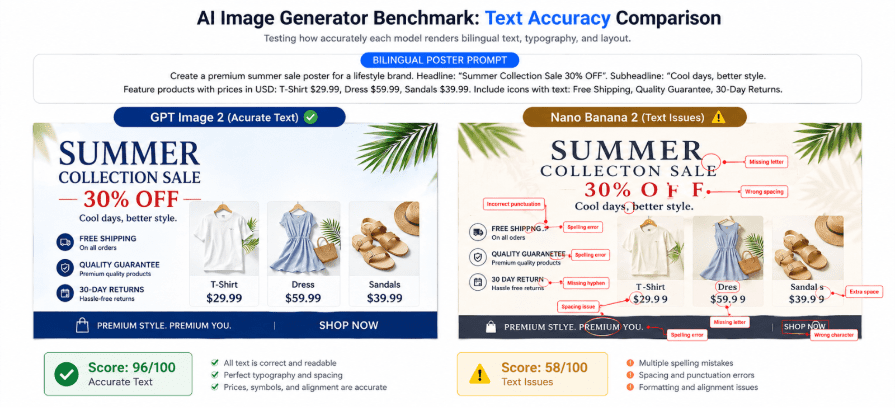
4. Text Rendering: ChatGPT Images 2.0 Wins Clearly
For a long time, every AI image tool had the same core problem: text inside images looked broken. Letters were garbled, words were misspelled, and non-Latin scripts came out as gibberish.
ChatGPT Images 2.0 is the first tool to fix this in a serious way. It achieves around 95% character-level text accuracy across Latin, Japanese, Korean, Chinese, Hindi, and Bengali scripts. The reasoning step it runs before generating an image means it plans where text needs to go and how it should be laid out before a single pixel is drawn.
Nano Banana 2 handles text better than its predecessor but still struggles with complex multi-line layouts, precise alignment, and dense typographic designs. For anything where the text inside the image is critical, such as a poster, infographic, product packaging mockup, or social media graphic with a headline, ChatGPT Images 2.0 is the better choice.
5. Photorealism and Image Quality: Nano Banana 2 Still Leads
When it comes to photorealism, the results flip. Nano Banana 2 produces more realistic lighting, richer textures, and sharper fine detail in scenes that are supposed to look like real photos.
In hands-on testing by PhotoWorkout, Nano Banana 2 preserved resolution better than GPT Image 2 in photo editing tasks, with output widths above 1500 pixels compared to OpenAI’s 1024-pixel cap at standard quality. It also handled skin tones, materials like fabric and metal, and complex lighting environments more convincingly.
That said, ChatGPT Images 2.0 is closing the gap. Its reasoning step does improve the structure and composition of images significantly. For pure artistic quality, cinematic scenes, or anything that needs to look like it was taken with a camera, Nano Banana 2 still has the edge.
6. Speed: Nano Banana 2 Is Dramatically Faster
This is the most obvious practical difference between the two tools.
ChatGPT Images 2.0 in thinking mode takes between 97 and 149 seconds to generate an image. That is a real wait. The reasoning step that makes the output better is also what makes it slow. For quick iteration, brainstorming, or any workflow that needs fast turnaround, that wait time is a problem.
Nano Banana 2 generates images in 11 to 24 seconds. That is roughly 5 to 10 times faster. For teams that need to review many options quickly, or for apps that serve images in near real time, the speed difference is not a minor detail. It is a fundamental workflow consideration.

7. Best Use Cases
Best for Individuals and Small Teams
If you are a solo creator, freelancer, or small team who makes content for social media, blogs, or marketing materials, here is the simplest way to think about it:
- Use ChatGPT Images 2.0 when your image needs readable text, a clear layout, or an infographic style
- Use Nano Banana 2 when your image needs to look realistic, cinematic, or like a professional product photo
- For speed and free access, Nano Banana 2 through the Gemini app is the easier starting point
- For precise control and better typography, ChatGPT Plus at $20 per month is worth it
Best for Enterprise and Development Teams
For teams building products, running marketing at scale, or integrating image generation into apps:
- ChatGPT Images 2.0 via the API is the best choice for UI mockups, infographic generation, educational content, and anything where text accuracy matters
- Nano Banana 2 via the Gemini API or Vertex AI is the better choice for e-commerce product imagery, campaign visuals, and any use case that needs high-resolution output at lower cost per image
- For compliance-heavy industries, Nano Banana 2 has the edge because of Google’s SynthID watermarking and C2PA Content Credentials, which help identify AI-generated content
- For developers who need batch generation, GPT Image 2 supports up to 8 consistent images from one prompt in thinking mode
8. What the Benchmarks Actually Show
On the Image Arena leaderboard as of April 2026, GPT Image 2 holds the top spot with an Elo score of 1,512 on text-to-image tasks and 1,513 on single-image editing. Nano Banana 2 sits in second place at 1,360. The 242-point gap is the largest ever recorded between first and second place on that leaderboard.
However, benchmark scores do not tell the full story. The PixVerse comparison that tested both tools with identical prompts found that the right answer depends entirely on the task type. GPT Image 2 won most often when the image had to communicate precise information. Nano Banana 2 won most often when the image had to look like it was photographed.
So the benchmark advantage for GPT Image 2 is real, but it is concentrated in specific categories. In photorealism categories, Nano Banana 2 still leads.

9. Gaps Worth Knowing About
Most comparison posts skip these, but they matter for real-world use.
GPT Image 2 Gap: Speed and Cost at Scale
Thinking mode is powerful but slow. At 97 to 149 seconds per image and up to $0.401 per high-quality 4K render, GPT Image 2 is not built for high-volume production workflows. Teams that need to generate thousands of images a month will face significantly higher costs and slower turnaround compared to Nano Banana 2.
Nano Banana 2 Gap:
No Native Reasoning Nano Banana 2 does not have a built-in reasoning step. It uses real-time web search to pull reference information, which helps with accuracy on current events, real places, and branded products. But it does not plan the layout of an image the way GPT Image 2 does, which is why complex text layouts and precise compositions still come out less reliably.
Both tools gap:
Copyright and Training Data neither tool gives you a completely clean copyright story. OpenAI says outputs are commercially usable under its terms of service. Google’s SynthID watermarking makes AI origin clearer but does not resolve underlying training data questions. For high-risk enterprise projects in regulated industries, you may still want to consult your legal team before using AI-generated images in public-facing campaigns.
It depends on what you are making. ChatGPT Images 2.0 is better for anything with text inside the image, infographics, layouts, or UI mockups. Nano Banana 2 is better for photorealistic scenes, product photography, and fast iteration. Many professionals use both.
Yes. Nano Banana 2 is available for free in the Gemini app and through Google Flow. For API access, you need a paid Google AI key. On higher plans like Google AI Pro and Ultra, you can also access the older Nano Banana Pro model for specialized tasks.
Via the API, pricing runs from $0.006 per low-quality image to $0.211 per high-quality 1024×1024 image and up to $0.401 for a 4K render. Via ChatGPT Plus at $20 per month, you get around 50 images every 3 hours. Thinking mode, which unlocks the full reasoning capabilities, requires Plus, Pro, Business, or Enterprise plans.
The thinking mode in ChatGPT Images 2.0 runs a reasoning step before generating the image. It plans the layout, checks the composition, and verifies text placement before drawing anything. That is what makes it so accurate, but it also takes between 97 and 149 seconds per image. If you turn off thinking mode, generation is faster but the quality advantage shrinks.
Not entirely, but both tools have already replaced Photoshop for the quick tasks most creators used it for, such as background swaps, style transfers, adding objects to a scene, and building mockups. For complex, precise editing work or pixel-level control, Photoshop is still necessary. But for fast content creation and iteration, both tools save significant time.
Conclusion
ChatGPT Images 2.0 and Nano Banana 2 are both genuinely good. The important thing is that they are not competing for the same job.
If your work involves text in images, structured layouts, diagrams, or anything that needs to communicate precise information clearly, ChatGPT Images 2.0 is the right tool. The reasoning step makes a real difference.
If your work involves product photography, cinematic scenes, photorealistic people or environments, or any workflow that needs fast turnaround and lower cost at scale, Nano Banana 2 is the stronger choice.
For most creative professionals in 2026, the answer is probably both. Use Nano Banana 2 for exploration and speed. Use ChatGPT Images 2.0 when precision and text accuracy are the priority.
Which one are you using right now, and what are you making with it? Drop a comment below. It would be good to hear what is actually working for people in real workflows.