

Introduction
Open almost any developer changelog from the past year, and you’ll likely come across the same three letters again and again: MCP.
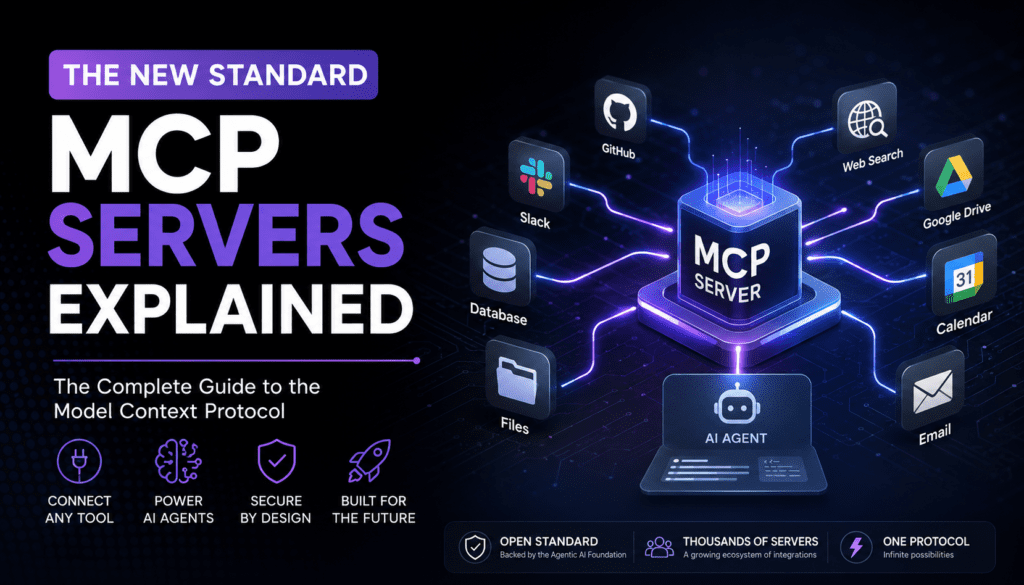
Anthropic introduced the Model Context Protocol (MCP) in November 2024. The goal was simple: allow AI models to communicate with external tools without requiring custom integration code for every connection. At first, it looked like a practical engineering solution for a specific problem. However, it quickly grew into one of the fastest-adopted standards in modern software development.
By late 2025, MCP had evolved beyond a single company’s project. The Linux Foundation brought it under the newly formed Agentic AI Foundation, giving it a neutral governance model similar to well-known open-source technologies such as Kubernetes and Node.js.
At the same time, industry adoption accelerated. Anthropic, OpenAI, Google, Microsoft, and many smaller tool providers added MCP support to their products. As a result, the public registry of MCP servers expanded to more than 10,000 entries, creating a rapidly growing ecosystem around the protocol.
If you build software, work with AI coding assistants, or lead teams experimenting with autonomous agents, there’s a good chance you’ve already interacted with MCP—even if you didn’t realize it.
In this guide, we’ll explore what an MCP server actually is, how the protocol works behind the scenes, where it offers advantages over traditional APIs, and where it doesn’t. Finally, you’ll learn how to build and deploy your own MCP server.

TL;DR Summary
Short on time? Here’s the essential version:
- An MCP server is a lightweight application that exposes tools, data sources, or prompt templates to AI systems through a shared and standardized protocol.
- Model Context Protocol (MCP) was introduced by Anthropic in November 2024. Today, it is governed by the Linux Foundation’s Agentic AI Foundation, with contributions from Anthropic, OpenAI, Block, and the broader developer community.
- MCP solves the classic N × M integration problem. Instead of building a separate connector for every AI model and every tool, developers can create a single MCP server that works with any MCP-compatible client.
- MCP servers communicate using JSON-RPC 2.0. They support both local connections through standard input/output (stdio) and remote connections through Streamable HTTP.
- The protocol revolves around three core building blocks: tools, resources, and prompts.
- Unlike traditional REST APIs, MCP servers are discoverable at runtime. An AI client can ask a server what capabilities it offers instead of relying on hardcoded endpoints.
- MCP does not replace REST or GraphQL. In most cases, MCP servers sit on top of existing APIs and present them in a format that AI models can understand and use more effectively.
- Security remains one of the protocol’s biggest challenges. For example, researchers have highlighted risks such as prompt injection and tool poisoning. Consequently, the specification continues to evolve with additional safeguards.
What Is an MCP Server?
An MCP server (Model Context Protocol server) is a small program that helps AI applications connect to external tools and services in a safe and standard way.
It acts like a bridge between an AI and real-world systems such as databases, calendars, code repositories, or apps.
Simple Idea
Think of an MCP server as a helper in the middle.
Instead of the AI directly talking to different tools (which would be messy and complex), the MCP server handles everything for it.
So the AI just says:
- “I need data”
- “Run this action”
- “What tools are available?”
And the MCP server responds in a clean, standard format.
What Does an MCP Server Do?
An MCP server can:
- Provide tools the AI can use (like search, database queries, file actions)
- Give access to data from external systems
- Offer prompt templates to guide AI responses
- Control permissions and safety rules
Why MCP Was Created
Before MCP, every AI tool needed separate custom connections for each service.
That caused problems like:
- Too much extra development work
- Hard to maintain integrations
- No common standard
MCP solves this by giving a universal standard for connections.
A Simple Example
Imagine a developer wants Claude or another AI assistant to check the weather before answering a question about whether an outdoor event should be postponed.
Without MCP, the developer would need to build a custom integration. That typically involves calling a weather API, processing the response, formatting the data, and then passing it into the model’s context. Moreover, the same integration work may need to be repeated for every AI application that requires weather information.
With MCP, the process becomes much simpler.
Instead of building separate integrations for different AI tools, the developer creates a single MCP server. That server might expose one tool called get_forecast. The tool accepts a location as input and returns a weather forecast as output.
Once the server is available, any MCP-compatible AI client can discover and use it automatically. Whether the request comes from Claude Desktop, an IDE extension, or a custom AI agent, the interaction works the same way.
As a result, the developer only has to build the integration once. The MCP server handles communication with the weather service, while AI clients can access the capability through a standardized interface. Even better, the server developer doesn’t need to know which specific AI product is making the request.
Why AI Models Need Better Tool Integration
Large language models are excellent at understanding and reasoning over text. However, they have an important limitation: they can only work with the information available in their training data or current conversation.
On their own, they can’t check today’s stock prices, view your team’s latest pull requests, or retrieve a customer’s recent order history. To access real-world information, they need a way to connect with external systems and services.
Before MCP, developers typically solved this problem through function calling. They would define a set of functions, describe them to the model, and allow the model to decide which function to use. The application would then execute the selected function and return the result back to the model.
This approach works well for smaller projects. However, it becomes harder to manage as the number of AI applications and external tools grows.
That’s where developers began running into what became known as the N × M problem.
The N×M Integration Problem
Imagine a company that wants to work with five different AI models and connect them to 200 external tools. These tools might include CRMs, ticketing platforms, databases, internal wikis, and other business systems.
Without a common standard, the numbers quickly become overwhelming. In theory, that setup could require up to 1,000 separate integrations. Each integration may have its own authentication method, request format, and maintenance requirements.
The challenge grows every time something new is added. If a new AI model enters the picture, developers may need to rebuild integrations for hundreds of existing tools. Likewise, when a new tool is introduced, it often needs to be integrated separately with every AI model that should access it.
MCP dramatically simplifies this situation.
Instead of building hundreds or thousands of custom connections, a tool provider creates a single MCP server. Any AI application that supports MCP can then discover and use that server through the same standardized interface.
This idea was central to Anthropic’s original vision for MCP. Much like USB-C standardized how devices connect to computers, MCP standardizes how AI systems connect to tools. Build the connector once, and any compatible client can plug into it.
Fragmented, Inconsistent Function-Calling Formats
MCP also solves another major challenge: inconsistency between AI platforms.
Before MCP, every model provider had its own way of describing tools, handling errors, and returning results. Some platforms used different formats for tool definitions, while others handled responses and streaming in unique ways. As a result, developers often had to build and maintain separate integrations for different AI providers.
This fragmentation created extra work and made cross-platform compatibility difficult. Even when two AI systems offered similar capabilities, the integration logic often had to be customized for each one.
MCP addresses this problem by introducing a common standard. It defines how messages are structured, how tools are discovered, and how tool calls are executed. The protocol also standardizes communication through JSON-RPC 2.0, ensuring that clients and servers follow the same rules.
As a result, developers can build an integration once and expect it to behave consistently across different MCP-compatible AI platforms. The underlying model may change, but the way tools are discovered and used remains the same..
Understanding Model Context Protocol (MCP)
At its core, Model Context Protocol (MCP) is an open standard, not a standalone product.
Anthropic introduced the first version of MCP on November 25, 2024, and released open-source reference implementations alongside it. The protocol was designed with a very specific purpose: creating a common way for AI applications to communicate with external tools and services.
Importantly, MCP focuses only on communication. It defines how three key components interact:
- Host – the AI application
- Client – the connector that communicates with servers
- Server – the provider of tools, resources, and capabilities
However, MCP does not dictate which AI model you use, how that model reasons, or what business logic runs behind the scenes. Those decisions remain entirely up to developers.
Rapid Industry Adoption
One reason MCP gained attention so quickly is that it solved a problem many AI teams were already facing.
Within months of its release, major technology companies began adding support for the protocol. OpenAI integrated MCP into its Agents SDK, Google adopted it within Gemini tooling, and Microsoft brought support to Copilot Studio and Visual Studio Code.
At the same time, AI-focused development platforms such as Cursor, Windsurf, and Claude Code started treating MCP as a primary way to extend agent capabilities.
As adoption accelerated, industry reports began highlighting impressive growth. By the end of 2025, MCP-related SDKs were seeing tens of millions of monthly downloads, while large enterprises and Fortune 500 companies were actively exploring MCP-based integrations.
From Proprietary Project to Neutral Governance
Rapid growth also raised an important question: who should govern the protocol?
Many organizations were hesitant to build critical infrastructure around a technology controlled by a single vendor. To address those concerns, Anthropic transferred MCP to the newly established Agentic AI Foundation (AAIF) on December 9, 2025.
The foundation operates under the Linux Foundation and also oversees projects such as Block’s Goose agent framework and OpenAI’s AGENTS.md convention.
As a result, MCP now benefits from a vendor-neutral governance model similar to those used by widely adopted open-source projects such as Kubernetes, PyTorch, and Node.js. For many enterprise teams, this significantly reduced concerns about long-term vendor dependency.
How MCP Continues to Evolve
MCP development is no longer driven by a small internal team. Instead, the protocol evolves through dedicated working groups and a formal Specification Enhancement Proposal (SEP) process.
Since its launch, several specification updates have introduced important capabilities, including:
- Structured tool outputs
- OAuth-based authorization
- Elicitation, which allows servers to ask users follow-up questions during a task
Development remains active. A larger update focused on a stateless protocol core and several new extensions is currently moving through release-candidate review and is expected to shape the next phase of MCP’s evolution throughout 2026.
How MCP Servers Work
Although MCP servers can connect to very different tools and services, the overall workflow remains largely the same. Instead of thinking about the protocol as a complex technical diagram, it is easier to understand it as a sequence of steps.
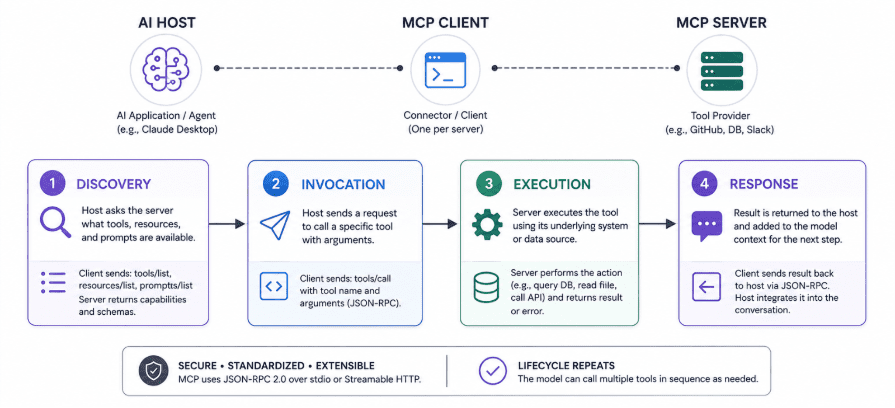
Initialization
The process begins when an AI application starts. This could be a desktop assistant, an IDE extension, or a custom AI agent.
The host application launches an MCP client for each configured server. The client and server then perform an initial handshake. During this step, they exchange protocol versions and identify any optional capabilities they support.
This ensures that both sides understand how to communicate before any requests are made.
Discovery
Once the connection is established, the client asks the server what capabilities it offers.
To do this, it uses methods such as:
tools/listresources/listprompts/list
The server responds with information about available tools, resources, and prompt templates. It also provides descriptions and structured input schemas.
As a result, the AI application can discover capabilities dynamically at runtime instead of relying on hardcoded integrations.
Context Provisioning
After discovery, the host prepares the available capabilities for the language model.
For example, discovered tools are converted into function definitions that the model can understand. At the same time, relevant resources and prompt templates become available within the conversation context.
This step gives the model awareness of what actions and information are available.
Tool Invocation
When the model determines that it needs external information, it can request a tool call.
Imagine a user asks:
“What are the open issues in the billing repository?”
If the required tool is available, the host instructs the client to send a tools/call request along with the appropriate tool name and arguments.
Execution
The MCP server receives the request and executes the underlying logic.
Depending on the tool, this might involve:
- Querying a database
- Calling a third-party API
- Reading a file
- Accessing an internal system
The server then returns a structured response. This response may contain text, JSON data, or error information that the model can interpret and react to.
Response Integration
Finally, the host inserts the tool’s response back into the model’s context.
The model can then continue its reasoning process using the newly retrieved information. It may answer the user immediately, perform additional analysis, or decide to call another tool.
Two Important Details
There are two practical details that are easy to overlook.
First, the model decides whether a tool should be used. Simply making a tool available does not guarantee that the model will call it.
Second, many MCP clients include a human approval step before executing actions that modify data or produce side effects. For example, a tool that deletes files or updates records may require confirmation before it runs.
Importantly, this approval mechanism is a safety feature implemented by many client applications. It is not a mandatory requirement of the MCP specification itself.
MCP Architecture Explained
MCP architecture has three roles. They’re easy to confuse at first because the names sound similar to general web terminology, but each one has a specific job.
Host
The host is the application the person actually uses — a chat interface, an IDE, or a custom agent runtime. It owns the conversation with the language model, decides which servers to connect to, and is responsible for surfacing approval prompts before risky tool calls run. Claude Desktop, Claude Code, Cursor, and VS Code are all examples of MCP hosts.
Client
Each client is a lightweight component, spawned by the host, that maintains exactly one connection to exactly one server. Keeping that relationship one-to-one is a deliberate security boundary: a client for the GitHub server can’t quietly reach into the Postgres server’s connection, which limits how far a compromised or misbehaving server can reach.
Server
The server is the program that actually exposes capabilities. It can run locally as a subprocess on the user’s machine or remotely as a hosted web service. A single host commonly connects to several servers at once — one for the file system, one for GitHub, one for a team’s internal ticketing tool — each managed by its own client.
The Three Server-Side Primitives
Everything an MCP server exposes falls into one of three categories. The distinction matters because each one is controlled by a different party in the system.
| Primitive | Controlled by | What it’s for | Real-world example |
| Tools | The model | Functions the AI can actively call to take an action or fetch something specific | create_issue, run_query, send_message |
| Resources | The application | Read-only data the host can attach to context, similar to a GET endpoint | A file’s contents, a database schema, a log file |
| Prompts | The user | Reusable templates that structure how the model should approach a task | A “summarize this PR” or “draft a release note” template |
On the other side of the connection, the client can expose its own primitives back to the server: roots (which directories or resources the client allows the server to access), sampling (letting a server ask the host’s model to generate a completion on its behalf), and elicitation (letting a server pause and ask the user a direct question mid-task, such as confirming a destructive action).
Transports: How the Messages Actually Travel
Every MCP message is a JSON-RPC 2.0 request, response, or notification. What changes is the transport that carries those messages between client and server.
| Transport | Best for | How it works | Trade-offs |
| stdio | Local tools on the same machine | The host spawns the server as a subprocess and exchanges messages over standard input/output | Fast, no network exposure, but limited to one machine and one user session |
| Streamable HTTP | Remote, production-grade servers | The server exposes an HTTPS endpoint; clients connect over the network and can stream partial results | Supports multiple concurrent clients and horizontal scaling, but needs authentication and hosting |
Streamable HTTP replaced an earlier HTTP-plus-Server-Sent-Events transport from the protocol’s first year, and it’s the transport most SaaS vendors use when they offer a hosted MCP endpoint rather than asking developers to run a server locally. The 2026 spec revision pushes this further by making the protocol’s core stateless, which is meant to let MCP servers run on ordinary load-balanced HTTP infrastructure the same way a typical web API does today.
MCP vs Traditional APIs
It’s tempting to think of MCP as a replacement for REST or GraphQL. That’s not quite right, and the mix-up causes a lot of confusion. MCP is a layer that typically sits on top of an existing API, translating it into a shape a language model can discover and call safely. A GitHub MCP server, for instance, still talks to GitHub’s REST and GraphQL APIs underneath; MCP just standardizes how an AI client finds and uses those capabilities.
| Aspect | Traditional REST/GraphQL API | MCP Server |
| Discovery | Developer reads docs and hardcodes endpoints ahead of time | Client queries the server at runtime to learn what’s available |
| Primary consumer | Built for human developers writing application code | Built for AI models reasoning about which capability to invoke |
| Description format | OpenAPI/Swagger docs, often separate from the code | Built-in machine-readable schemas the model can read directly |
| Statefulness | Usually stateless request/response per call | Supports stateful sessions, streaming, and server-initiated notifications |
| Integration effort per pairing | One integration per app-to-API pairing | One server works with any MCP-compatible client |
| Security model | Varies widely by API; often broad API keys | Designed around scoped access, human approval steps, and tool annotations |
The practical takeaway: if you’re building a service for other developers to call directly, REST or GraphQL still does the job well. If you’re trying to make that same service usable by an AI agent without writing custom integration code for every AI product on the market, wrapping it in an MCP server is the more future-proof move.
Benefits of MCP Servers
- Write once, use everywhere — a single MCP server works across any compliant host, so the integration cost is paid once instead of once per AI product.
- Runtime discoverability means an AI client can adapt to new capabilities the moment a server adds them, without a code change on the client side.
- A consistent message format and capability model make it easier to audit, test, and reason about what an agent is allowed to do.
- Tool annotations let a server flag whether an action is read-only, destructive, or idempotent, giving host applications a basis for deciding when to ask for human confirmation.
- The ecosystem effect is real: with thousands of pre-built servers already available, most teams can assemble a working agent setup from existing components rather than building integrations from zero.
- Standardization lowers the switching cost between AI providers — a business that swaps from one model vendor to another doesn’t need to rebuild its tool integrations if both sides speak MCP.
Real-World MCP Use Cases
AI Coding Assistants
This is where MCP first found its footing. Tools like Claude Code and Cursor use MCP servers to let an agent read a repository’s actual file structure, check git history, run tests, and open pull requests, instead of guessing at code it can’t see. A developer can ask an agent to fix a failing test, and the agent can pull the actual error log through a filesystem or CI server rather than relying on a pasted snippet.
Customer Support and CRM Automation
Support agents built on MCP can pull a customer’s order history, open tickets, or subscription status from a CRM mid-conversation, then draft a response grounded in real account data instead of generic boilerplate.
Data Analysis
Analysts connect a Postgres or SQLite MCP server so an agent can run scoped, read-only queries against production data and summarize results in plain language, without exporting a spreadsheet first.
DevOps and Infrastructure
Teams wire agents into deployment pipelines, monitoring dashboards, and cloud provider APIs through MCP servers, so an agent can check a build’s status, read recent error logs from a tool like Sentry, or trigger a redeploy — usually behind an explicit human approval step for anything irreversible.
Enterprise and Financial Services
Larger organizations have started treating MCP as foundational integration infrastructure rather than a developer convenience. Bloomberg has publicly described MCP as a building block for the APIs it expects to need in an agentic AI era, which is a useful signal that the protocol is being taken seriously well beyond hobbyist tooling.
Personal Productivity Agents
On the consumer side, MCP servers for email, calendars, and note-taking apps let a personal AI assistant draft replies, schedule meetings, or pull notes into context, typically with scoped, read-only access by default and explicit consent before anything gets sent or changed.
Best MCP Servers for Developers
You rarely need to build a server from scratch to get started. The ecosystem already covers most everyday developer workflows. The table below covers servers that show up consistently across community rankings in 2026, organized by what they’re best used for.
| Server | Category | What it’s best for |
| Filesystem | Local files | Scoped read/write access to a chosen directory — the standard starting point for any coding agent |
| GitHub | Source control | Creating and reviewing pull requests, searching code, managing issues across repositories |
| Git | Source control | Structured access to branches, commits, and diffs without parsing raw shell output |
| Postgres / SQLite | Databases | Running scoped queries against relational data and reading schema information |
| Slack | Team communication | Reading channels, posting messages, and searching conversation history |
| Fetch / Brave Search | Web access | Retrieving and reading live web pages or running search queries from inside an agent |
| Playwright / Puppeteer | Browser automation | Driving a headless browser to test web apps or extract content from JavaScript-rendered pages |
| Google Drive | Documents | Reading and searching shared documents, spreadsheets, and slide decks |
| Memory | Agent state | Persisting facts or context across sessions so an agent doesn’t start from zero each time |
A consistent piece of advice across community write-ups is worth repeating: start small. Connecting two or three servers that match your actual daily workflow covers most needs. Beyond five to seven active servers, the volume of tool descriptions competing for the model’s attention tends to degrade an agent’s ability to pick the right tool, a problem people in the ecosystem call tool bloat.
Reference implementations live in the official modelcontextprotocol/servers repository on GitHub. Community marketplaces like Glama and curated “awesome MCP servers” lists are also good places to check before building something that may already exist.
Building Your First MCP Server
If none of the existing servers cover what you need, building one is a manageable weekend project rather than a major undertaking. Official SDKs exist for TypeScript, Python, Go, Kotlin, and several other languages, all maintained either by Anthropic or in close collaboration with the wider community (the Go SDK, for example, is maintained jointly with Google).
Step-by-Step Outline
- Decide on the capability surface. Pick a narrow, well-defined job for the server — “manage issues in one ticketing system” is a better scope than “do everything our internal tools can do.”
- Install the SDK. For a TypeScript server, that’s typically a single package install; the SDK provides the boilerplate for handling the protocol handshake and message routing.
- Define your tools. For each tool, write a clear name, a human-readable description (the model reads this to decide when to use the tool), and a structured input schema.
- Implement the handler. Write the function that actually runs when the tool is called — querying a database, hitting an internal API, reading a file — and return a structured result.
- Add tool annotations. Mark whether each tool is read-only, destructive, idempotent, or reaches outside the local environment, so host applications can decide when to require approval.
- Choose a transport. Use stdio for a server meant to run locally on a developer’s machine, or Streamable HTTP if you’re hosting it centrally for a team.
- Test locally. Connect the server to a host like Claude Desktop or an MCP inspector tool, run through the discovery and invocation flow manually, and check the responses look right.
- Document and share. If the server is useful beyond your own project, publish it to the official registry or a community list so others can find it.
A Minimal Tool Definition
Most TypeScript-based servers follow a similar shape: register a server name and version, declare one or more tools with a schema, and implement a handler. A trimmed-down example for a weather tool looks roughly like this:
server.registerTool(
“get_forecast”,
{ description: “Get a weather forecast for a city”, inputSchema: { location: “string” } },
async ({ location }) => fetchForecast(location)
);
The SDK takes care of turning that registration into the JSON-RPC messages a client expects, so most of the actual development work is just the handler logic — the part that’s specific to whatever system you’re connecting.

Security and Best Practices
MCP’s biggest open challenge isn’t a missing feature — it’s trust. Because tool descriptions and tool outputs both land directly in a model’s context, and the model is built to follow instructions wherever it finds them, the protocol creates a new path for attacks that didn’t exist with traditional APIs.
Known Risk Patterns
- Tool poisoning — an attacker crafts a tool’s name or description to contain hidden instructions that only the model sees, not the user, which can trick the model into leaking data or calling other tools it shouldn’t.
- Rug-pull attacks — a tool behaves normally during review and approval, then changes its behavior or description after a user has already trusted it.
- Indirect prompt injection — malicious instructions arrive inside a tool’s output (a scraped web page, a file’s contents, an email body) rather than the tool definition itself, and the model treats that content as trustworthy context.
- Over-privileged servers — a server requests far broader access than its actual job requires, so a single compromised tool can reach much more than it needs to.
- Credential sprawl — teams accumulate API keys and tokens across dozens of ungoverned servers with no central place to audit or revoke access.
Practical Mitigations
- Apply least-privilege scopes to every server connection; a tool that only needs to read data should never hold write or delete permissions.
- Require an explicit human approval step for destructive or irreversible actions — database deletions, financial transactions, bulk edits, anything sent externally.
- Read and trust tool annotations (read-only, destructive, idempotent, open-world) as a starting point for deciding which calls need extra scrutiny, but enforce those restrictions at the server level rather than relying on the model to police itself.
- Vet third-party servers before connecting them, the same way you’d review a new dependency — check maintenance activity, source, and whether the project is from a known publisher.
- Pin server versions where possible and re-review tool descriptions after updates, since a rug-pull attack specifically exploits the assumption that an approved tool stays the same.
- Use OAuth-based, scoped authorization for remote servers rather than long-lived static API keys, in line with the protocol’s move toward stronger OAuth and OpenID Connect alignment.
Security researchers tracking prompt injection broadly have made the point for years that the industry still lacks a fully reliable technical fix for the underlying problem, and MCP doesn’t change that math — it just creates a new, very common surface where the issue shows up. The specification itself explicitly calls for a human in the loop as a baseline safeguard, which is a tacit admission that the protocol alone can’t solve trust.
Common Challenges and Limitations
- Tool bloat — connecting too many servers at once floods the model’s context with competing tool descriptions and measurably hurts its ability to pick the right one.
- Inconsistent server quality — with thousands of community-built servers, documentation, error handling, and reliability vary widely; the official reference servers tend to be the safest starting point.
- Rapid spec evolution — the protocol has shipped several breaking and non-breaking revisions in under two years, so server and client maintainers need to track changelogs and the new formal deprecation policy.
- Latency for remote servers — a Streamable HTTP server adds network round-trip time to every tool call, which matters for agents chaining many calls together in a single task.
- No built-in monetization standard — the protocol doesn’t define how a paid API should bill for MCP-mediated usage, so vendors are layering their own metering and billing on top.
- Trust verification at scale — a public registry existing doesn’t automatically mean every listed server has been vetted; discoverability and security review are still separate problems.
The Future of MCP and AI Agents
MCP has already become one of the most widely adopted standards in the AI ecosystem. However, its development is far from finished.
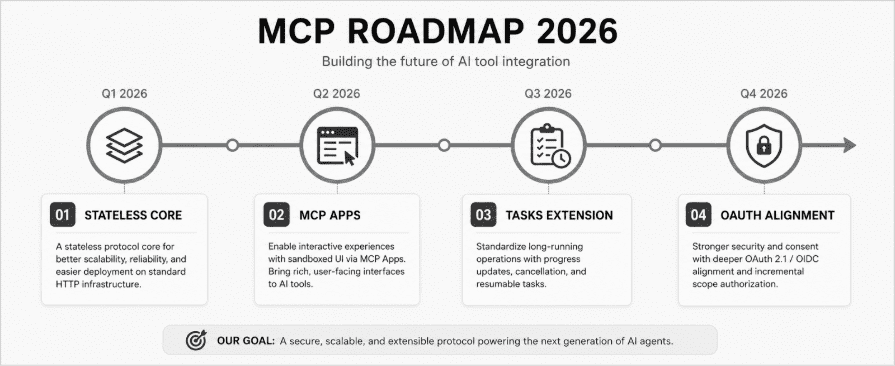
The 2026 roadmap, guided by working groups within the Agentic AI Foundation, focuses on four major priorities:
- Better transport scalability
- Agent-to-agent communication
- Stronger governance
- Enterprise readiness
Among these goals, the most significant change is the move toward a stateless protocol core.
A More Scalable Foundation
Today, many MCP deployments rely on session-based communication. While this works well, it can introduce additional complexity when systems need to scale.
The upcoming stateless architecture aims to simplify deployment. Instead of requiring specialized session management, MCP servers will be able to run on the same load-balanced HTTP infrastructure that powers modern web applications and APIs.
As a result, organizations will be able to scale MCP services more easily and integrate them into existing cloud environments.
MCP Apps and Long-Running Tasks
Alongside the stateless core, two major extensions are expected to expand what MCP-based applications can do.
The first is MCP Apps.
This extension allows a server to provide an interactive HTML interface that a host application can render inside a secure sandbox. Rather than returning only text responses, tools can present visual interfaces, forms, dashboards, and other interactive experiences.
The second is the Tasks Extension.
Many real-world operations take longer than a few seconds to complete. For example, generating reports, processing large datasets, or running complex workflows may require ongoing status updates.
The Tasks Extension introduces a more flexible workflow that allows clients to monitor progress, receive updates, and even cancel operations while they are still running.
Stronger Security and Authorization
Security remains a major focus for the MCP ecosystem.
The protocol is moving toward closer alignment with widely adopted standards such as OAuth and OpenID Connect. One important improvement is support for incremental consent.
Instead of requesting broad permissions upfront, a client can ask for only the specific access required for a particular action. This approach follows the principle of least privilege and reduces unnecessary exposure.
In addition, MCP is introducing a formal deprecation policy. This will make it easier to evolve the protocol over time without unexpectedly breaking existing integrations.
The Bigger Trend: Convergence
Perhaps the most interesting development is happening beyond MCP itself.
The broader AI ecosystem appears to be converging around a shared set of standards rather than fragmenting into competing approaches.
For example, the W3C has started exploring a browser-native WebMCP API that could allow websites to expose JavaScript functions directly as AI-callable tools. At the same time, the Agentic AI Foundation now oversees projects such as MCP, Block’s Goose, and OpenAI’s AGENTS.md convention.
Taken together, these developments suggest that the industry is moving toward a common foundation for agentic software. Instead of every vendor creating its own incompatible framework, AI systems may increasingly rely on a small set of open, vendor-neutral building blocks that work across platforms.
Frequently Asked Questions
What is an MCP server in simple terms?
An MCP server is a small program that gives an AI assistant a defined, safe way to use a specific tool or data source — for example, reading files, querying a database, or posting to Slack — using a shared communication standard called the Model Context Protocol.
Who created the Model Context Protocol?
Anthropic created and released MCP in November 2024. In December 2025, Anthropic donated the protocol to the Agentic AI Foundation, a project under the Linux Foundation, so it’s now governed by a broader community rather than a single company.
Is MCP the same thing as an API?
Not exactly. MCP is a protocol that usually sits on top of an existing API. The API still does the underlying work; MCP standardizes how an AI client discovers and calls that work in a way the model can reason about safely.
Do I need to know how to code to use MCP servers?
To use one — connecting Claude Desktop or Cursor to an existing MCP server — usually just requires editing a configuration file with the server’s name and, for some servers, an API key. Building a new server from scratch does require programming experience.
Are MCP servers safe to use?
Official and well-maintained community servers are generally safe when scoped correctly, but the protocol does carry real risks like tool poisoning and prompt injection through tool descriptions or outputs. Stick to least-privilege access, review unfamiliar servers before connecting them, and require approval for any action with side effects.
What’s the difference between MCP tools, resources, and prompts?
Tools are actions the model can actively call, similar to a function. Resources are read-only data the application can attach to context, similar to a GET request. Prompts are reusable templates the user selects to structure a task. Each is controlled by a different party in the system.
Can MCP work with AI models other than Claude?
Yes. MCP is model-agnostic by design. OpenAI’s Agents SDK, Google’s Gemini tooling, and Microsoft’s Copilot ecosystem all support it, and any AI application that implements the client side of the spec can use any compliant MCP server.
How many MCP servers exist today?
The official MCP registry has tracked close to ten thousand actively listed servers, and broader GitHub ecosystem counts (repositories tagged as MCP servers across all sources) run higher than that. The exact number changes monthly as new servers are published.
Does MCP use REST, WebSockets, or something else?
MCP messages are JSON-RPC 2.0, carried over one of two transports: stdio for local processes on the same machine, or Streamable HTTP for remote servers accessed over a network connection.
Will MCP replace traditional APIs entirely?
No. MCP is a layer for AI-to-tool communication, not a general-purpose replacement for REST or GraphQL. Most production MCP servers wrap an existing API rather than replacing it, and traditional APIs remain the right choice when the consumer is human-written application code rather than an AI agent.
Conclusion
MCP didn’t win adoption because it was clever marketing — it won because it solved a problem nearly every team building with AI was running into independently: too many one-off integrations, too little consistency between them. Standardizing that layer, then handing governance to a neutral foundation, gave the ecosystem enough stability for vendors across the industry to build on top of it without worrying about a single company’s roadmap.
If you’re starting from zero, the practical path is straightforward: pick two or three official servers that match a workflow you actually have, connect them to a host you already use, and get a feel for how discovery and tool calls work before building anything custom. The protocol is still evolving quickly, particularly around security and authorization, so it’s worth keeping an eye on the specification’s changelog rather than treating any single integration as permanent.
Whether MCP ends up being remembered as the definitive standard for agent-to-tool communication or as one important step toward something broader, it’s already reshaped how a large slice of the AI tooling world gets built. That’s a reasonable bar for calling something the new standard.