
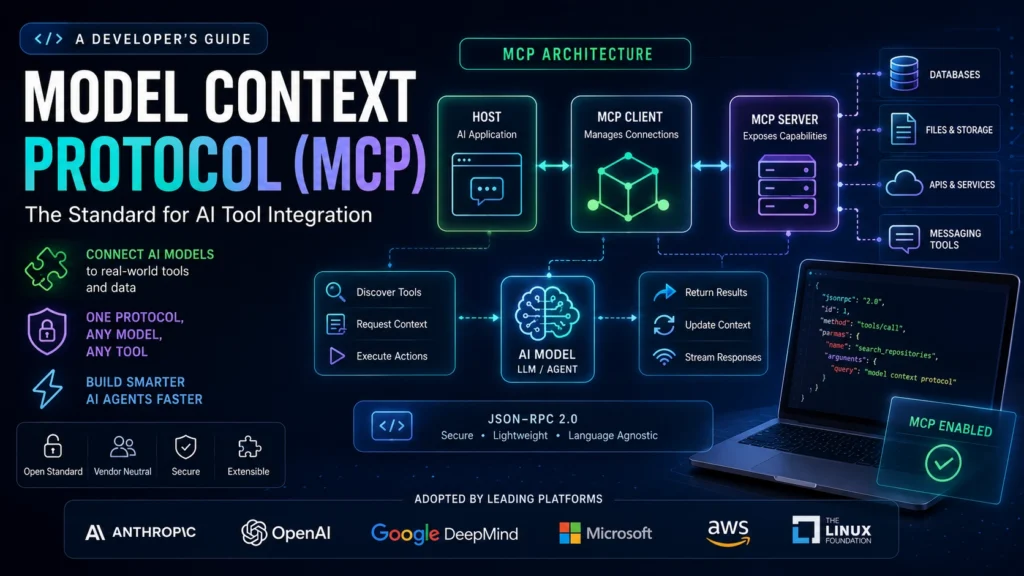

If you’ve spent any time building AI-powered tools in the last year, you’ve probably heard ‘MCP’ come up. A lot. Model Context Protocol started as an Anthropic project in late 2024, and by mid-2026 it had become the default plumbing for connecting AI agents to the outside world — adopted by OpenAI, Google DeepMind, Microsoft, AWS, and now governed by the Linux Foundation.
So what actually is Model Context Protocol, and why does it matter for developers? This guide breaks it down — the architecture, the problem it solves, how to get started, and the rough edges you should know about before you ship anything.
What Is Model Context Protocol and Why Developers Use It?
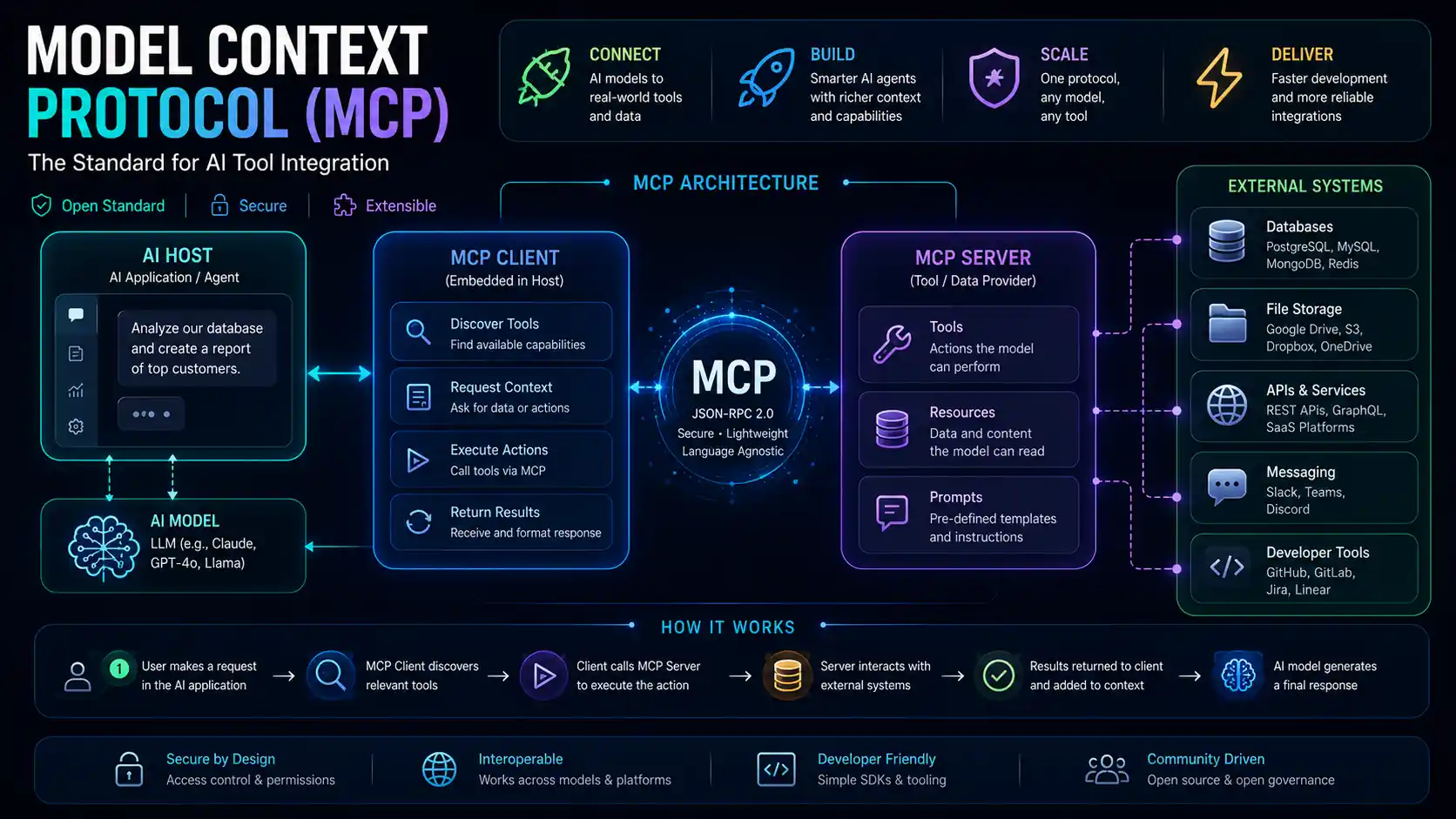
Model Context Protocol (MCP) is an open standard that defines how AI applications communicate with external tools, databases, and services. Think of it as a universal connector layer — instead of writing a custom integration every time you want an AI model to talk to, say, GitHub or a Postgres database, you build one MCP server and any MCP-compatible AI host can use it.
Anthropic released it in November 2024 alongside reference servers for GitHub, Slack, Google Drive, Postgres, and a handful of other common tools. The analogy they use — and honestly it’s a good one — is USB-C. Before USB-C, every device came with its own charger. You had a drawer full of incompatible cables. MCP does for AI integrations what USB-C did for device connectivity.
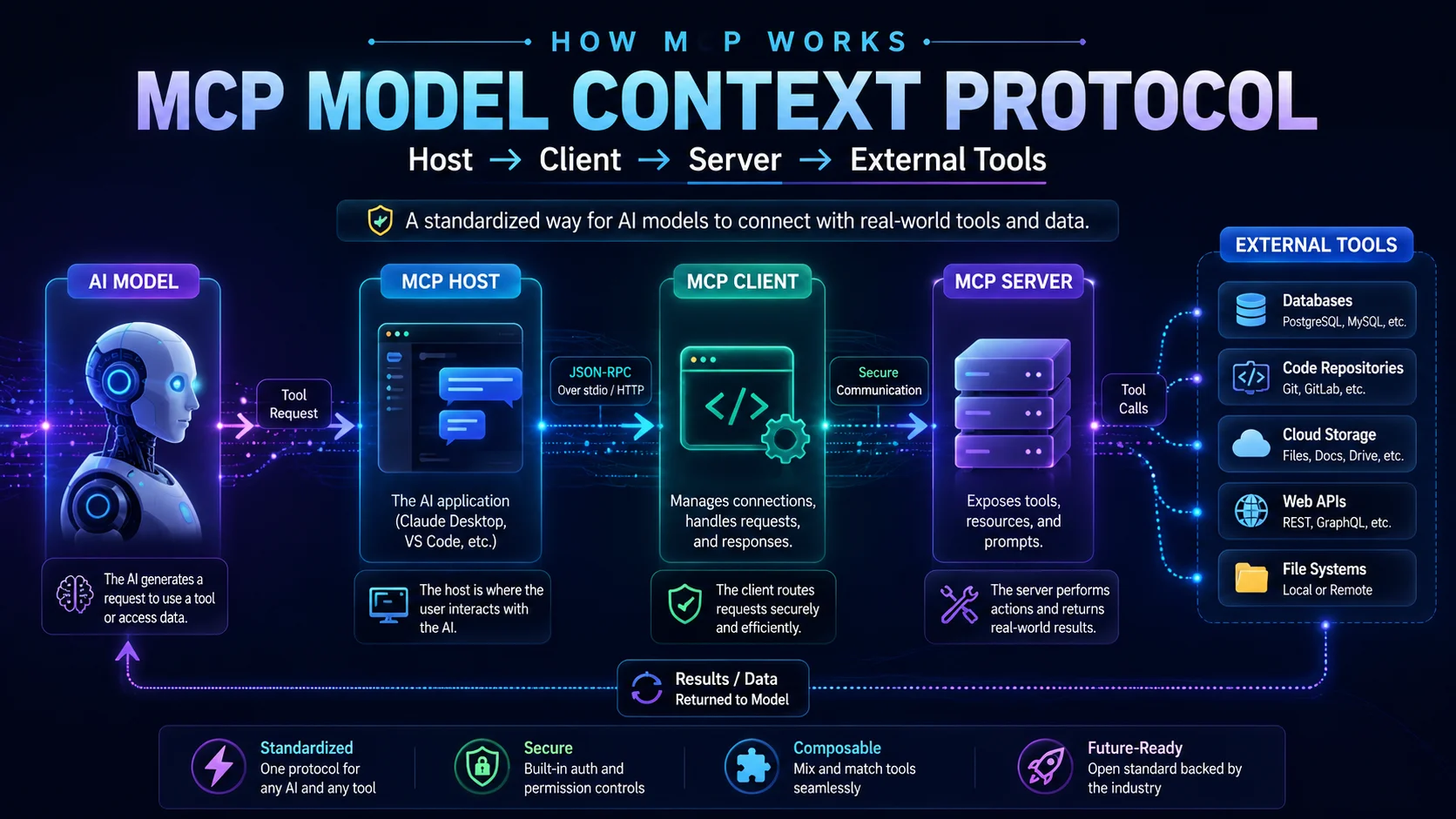
Under the hood, it runs on JSON-RPC 2.0. The communication happens between three roles: the host (the AI-facing app the user interacts with, like Claude Desktop or a custom agent), the client (embedded inside the host, manages connections), and the server (a lightweight process that exposes specific capabilities — database access, file reads, API calls, whatever you’re building). The model discovers available tools at runtime through manifests, which is a big departure from older approaches where every integration was hardcoded.
The Problem MCP Actually Solves
Before MCP, connecting an LLM to external tools meant dealing with what Anthropic called the N×M integration problem. Say you have 4 AI apps and 8 business systems. Without a standard protocol, you need 32 separate connectors — each tightly coupled to one specific model’s API format and one specific tool’s interface. When either side changed, something broke.
Honestly, this was a real pain. Every time you wanted to try a different model, you’d have to rewrite your tool integrations. And every vendor had their own slightly different function-calling format, so none of it was portable.
MCP flips this to N+M. Each tool gets one MCP server. Each AI host gets one MCP client. They speak the same protocol, so any host can connect to any server regardless of what model is underneath. Switching from GPT-5 to Claude Opus or a self-hosted Llama 4 becomes a configuration change, not an engineering project.
How Model Context Protocol Works: Architecture Explained
Hosts, Clients, and Servers
The host is whatever the user interacts with — Claude Desktop, VS Code with Cline, Cursor, or a custom agent you’ve built. It contains the MCP client, which manages all server connections on behalf of the model.
The MCP server is the piece you build as a developer. It exposes capabilities — tools (things the model can do, like run a query), resources (data it can read, like a document), and prompts (templated instructions). When the model needs something, the host asks the relevant client to call the right server, the server performs the action, and results get injected back into the conversation context.
Two Transport Options
MCP servers communicate over one of two transports. stdio is local subprocess communication — your server runs as a child process on the same machine as the host. It’s fast, requires zero network configuration, and is perfect for local development setups. The tradeoff is that it typically serves a single client.
Streamable HTTP is for production. Your server exposes an HTTPS endpoint, supports multiple concurrent clients, scales horizontally, and integrates with enterprise auth flows using OAuth 2.1. If you’re deploying to Cloudflare, AWS, or any cloud platform, this is what you use. Both transports use the same JSON-RPC message format, so your tool definitions are fully portable between the two.
Model Context Protocol Adoption in 2026
The adoption curve has been unusually fast for an infrastructure standard. Anthropic launched in November 2024 with about 2 million monthly SDK downloads. OpenAI adopted it by March 2025, which was the real signal — when your main competitor adopts your protocol, it stops being a company project and starts becoming an industry standard. Microsoft added MCP to Copilot Studio in mid-2025, AWS followed, and by December 2025 Anthropic donated the whole thing to the Agentic AI Foundation under the Linux Foundation.
By mid-2026, over 10,000 active public MCP servers exist, covering databases, file storage, messaging tools, project management, web scraping, and plenty more. The monthly SDK downloads across Python and TypeScript crossed 97 million. All major AI platforms now support it natively.
Worth noting: the Linux Foundation governance move was strategically important. MCP isn’t a single vendor’s side project anymore. No one company can change the spec unilaterally or deprecate it for competitive reasons.
MCP vs. Traditional Custom Integrations
| Without MCP | With MCP | |
| Integration effort | One custom connector per model-tool pair (N×M) | One MCP server per tool, works with any model (N+M) |
| Switching models | Rewrite all integrations | Point to a different host, no server changes |
| Tool discovery | Hardcoded in application logic | Dynamic at runtime via tool manifests |
| Security boundary | Bespoke per integration | Standardized server-side access controls |
| Community ecosystem | Fragmented, vendor-specific | 500+ public MCP servers (mid-2026) |
Getting Started: Building Your First MCP Server
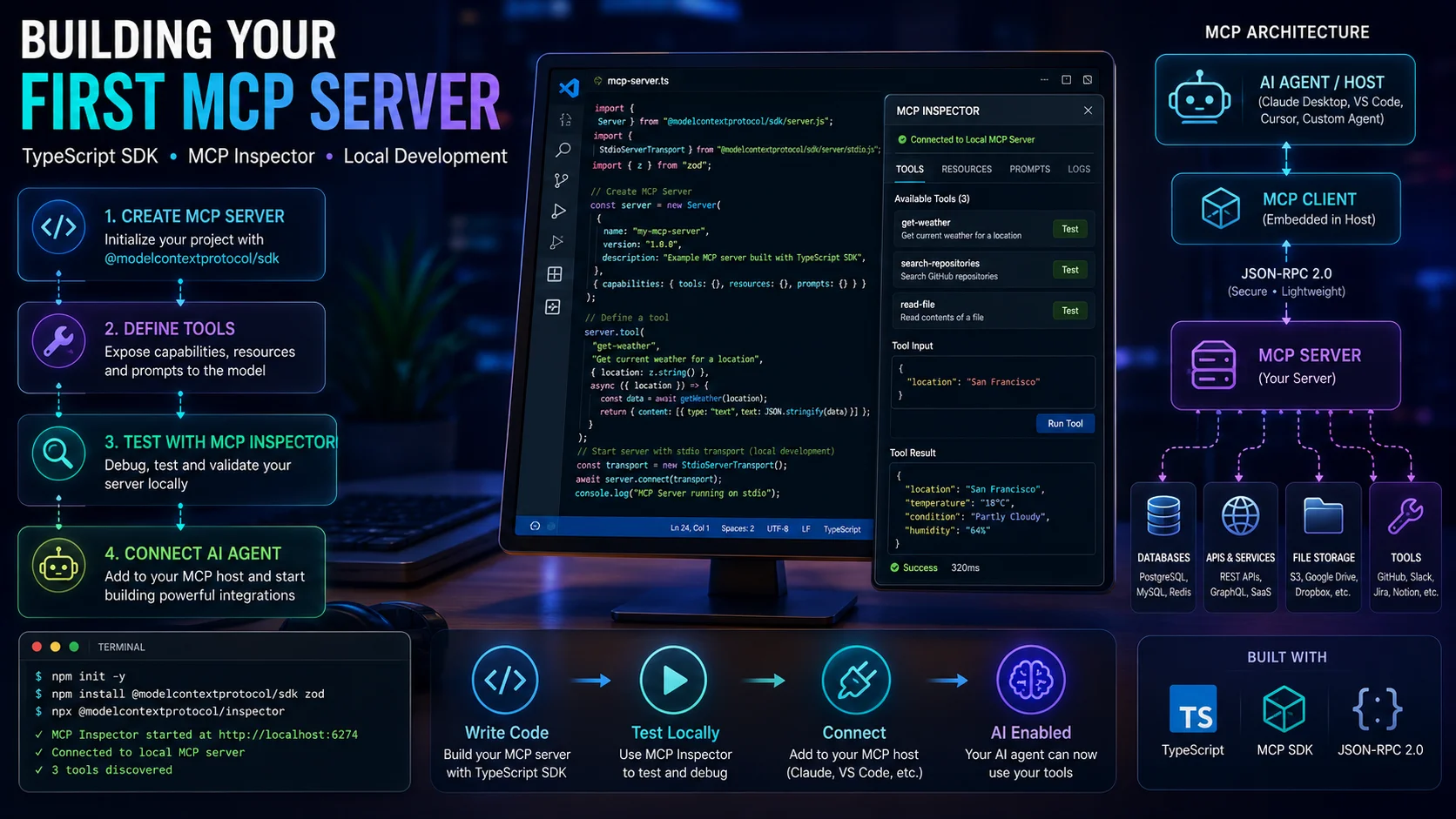
The fastest path to a working MCP server is the TypeScript SDK. Here’s the basic shape of what you’re doing:
- Install the SDK: npm install @modelcontextprotocol/sdk
- Create a server instance and define your tools with JSON schema descriptions.
- Implement the tool handler — what should actually happen when the model calls this tool.
- Connect the server using stdio transport for local development.
- Add it to Claude Desktop or another MCP-compatible host via the config file.
- Test with the MCP Inspector (npx @modelcontextprotocol/inspector) before connecting a live model.
The MCP Inspector is genuinely useful here. It gives you a UI to list available tools, test invocations, and inspect the JSON-RPC traffic without involving an LLM at all. Debug your server logic there first, then connect it to your actual AI host.
For production, swap stdio for Streamable HTTP and add OAuth 2.1 authentication. You’ll also want to think carefully about what permissions your server exposes — more on that in the next section.
Security Considerations You Shouldn’t Skip
MCP opens a new attack surface. The protocol lets an AI agent reach real data and take real actions, so conservative defaults matter. A few things to know:
Tool poisoning is the main one to watch. A malicious or compromised MCP server could register tools with names that mimic trusted ones — the classic example is get_salesforce_contacts vs. get_saIesforce_contacts (capital i instead of lowercase L). The model picks the wrong one silently. Keep your server registry curated and verify sources before connecting anything.
Prompt injection via tool output is another real risk. If your MCP server returns user-generated content — support tickets, CRM notes, anything users can write — that content lands in the model’s context. A malicious payload could manipulate the model into calling other tools or exfiltrating data. Sanitize what you return.
Over-permissioned servers are the easiest mistake to make. Expose only the operations the model actually needs. If you only need read access to a database, don’t give the server write permissions. MCP’s server-side access control model makes this straightforward — it’s worth doing properly from the start rather than locking things down after an incident.
In April 2026, OX Security disclosed a vulnerability affecting MCP stdio transport and local process execution, reportedly impacting official SDKs in Python, TypeScript, Java, and Rust. The MCP team addressed it, but it’s a useful reminder that this is still a young protocol in a fast-moving space. Stay current with spec updates.
Common Questions About Model Context Protocol
Is MCP the same as function calling?
Not exactly. OpenAI’s function calling (introduced in 2023) was an early attempt at the same problem, but it was vendor-specific — you wrote your tool definitions for OpenAI’s format, and they didn’t work anywhere else. MCP is vendor-neutral and standardized across providers. Most MCP servers actually wrap existing REST APIs underneath, so they’re complementary rather than competing approaches.
Do I need MCP if I’m already using LangChain or LangGraph?
They solve different layers. LangChain and LangGraph are orchestration frameworks — they manage agent loops, memory, and workflow logic. MCP is the connectivity layer that lets those agents reach external tools and data. The two work together; you’d use LangGraph for the agent logic and MCP servers for the tool integrations. Some teams are migrating their custom tool wrappers to MCP servers specifically to get the portability benefit.
Will MCP replace REST APIs?
No. REST APIs serve human-written application code. MCP exposes those same APIs to AI agents in a format the model can discover and reason about at runtime. Most MCP servers just wrap existing REST APIs under the hood — the GitHub MCP server calls the GitHub REST API, the Jira MCP server calls the Jira REST API. It’s a layer on top, not a replacement.
Is MCP safe for enterprise use?
With the right implementation, yes. Each MCP server enforces its own access controls, every tool call goes through a defined and loggable interface, and the Linux Foundation governance means the spec isn’t going to change arbitrarily. The security risks mentioned above are real but manageable — the same way any API integration has risks that careful engineering can address. For regulated industries, the auditability of MCP’s server-side model is actually a selling point.
How hard is it to build an MCP server from scratch?
Not hard for a basic implementation. The TypeScript and Python SDKs are well-documented, and a simple server with a few tools can be up and running in an afternoon. Production-grade servers with authentication, error handling, and horizontal scaling take more work — but the same is true of any backend service. The MCP Inspector makes debugging significantly faster than doing it blind.
Where This Is Heading
The pattern here isn’t complicated. AI models are getting more capable, but capability alone isn’t enough — they need access to real systems to be genuinely useful. MCP is the infrastructure that makes that access standardized, auditable, and portable across models and vendors.
Whether you’re building internal tooling, an AI-powered product, or just experimenting with agents, understanding Model Context Protocol is increasingly baseline knowledge for anyone working in this space. The ecosystem is already large enough that you probably won’t need to build servers for the most common tools — you’ll just pull from the existing registry. Where MCP gets interesting is the custom stuff: your internal APIs, your proprietary data sources, the systems that don’t have a pre-built server yet.
That’s where developers who actually understand the protocol have an edge right now.